
Green glowing circular pattern with concentric rings and faint hexagonal grid on the left side.
Blue abstract hexagonal pattern with glowing circular gradient edges on a black background.Glowing greenish-blue hexagonal pattern with concentric circular gradients on a black background.

IT Help Desk Outsourcing Guide: Costs, Models & How to Choose (2026)

Calendar Icon
Published:
Oct 4
2026
,
Updated:
Oct 4
2026
Ann
Facebook IconInstagram Icon

Build your team with NeoWork

Talk to us about how we staff and manage high-performing remote teams for companies like yours.

Get an IT Help Desk Outsourcing Quote

Quick Summary: IT help desk outsourcing means hiring a third-party provider to handle end-user technical support, from password resets to ticket escalation, usually billed per user or per ticket. Done right, it cuts support costs by 30-50%, improves response times, and frees internal IT staff for strategic projects. The key to success lies in choosing the right pricing model, setting clear SLAs, and vetting a provider's security practices before signing anything.

Most IT teams hit the same wall eventually: tickets pile up faster than anyone can resolve them, and the people best equipped to drive strategic projects spend their mornings resetting passwords instead. That's usually the moment "outsourcing the help desk" stops being a theoretical idea and starts looking like a real option.

This guide breaks down what IT help desk outsourcing actually involves, what it costs in 2026, which models fit which businesses, and how to avoid the mistakes that turn a cost-saving move into a support nightmare. No fluff, just the practical stuff decision-makers actually need before they call a vendor.

What Is IT Help Desk Outsourcing?

IT help desk outsourcing is the practice of contracting an external provider to manage some or all of a company's first-line technical support. Instead of hiring, training, and scheduling an in-house support team, a business pays a specialist vendor to staff that function — often around the clock.

The outsourced team typically handles the repetitive, high-volume stuff: password resets, software installs, printer issues, account lockouts, basic troubleshooting. More advanced providers also take on network monitoring, patch management, and even cybersecurity incident response, depending on the contract.

In practice, the provider becomes the "one number to call" for employees. Tickets get logged, triaged, and either resolved on the spot or escalated to the client's internal team or a specialized engineer, all against a written response-time commitment.

Why Companies Outsource Their Help Desk

The reasons tend to cluster around a handful of recurring business pressures. Growth outpaces hiring. Budgets tighten. Security expectations rise faster than internal expertise can keep up. Outsourcing addresses several of these at once.

  • Cost control: Avoiding full-time salaries, benefits, and training costs for a function that doesn't need to live in-house.
  • 24/7 coverage: Round-the-clock support without asking internal staff to work nights and weekends.
  • Faster response times: Dedicated teams with ticketing tools built specifically for support, not improvised workflows.
  • Scalability: Adding or removing support capacity as headcount or seasonal demand shifts, without a hiring cycle.
  • Freeing internal IT: Letting in-house engineers focus on infrastructure, projects, and strategy instead of tier-1 tickets.

None of this means outsourcing is automatically the right call for every business. It's a trade-off, and the next sections dig into exactly what that trade-off looks like.

Outsourcing Models: Which One Fits?

Not all outsourced help desks look the same. The structure a business chooses shapes cost, control, and how quickly issues actually get resolved.

Fully Outsourced Help Desk

The provider owns the entire support function — tier-1 through tier-3 — with no internal IT support staff at all. This suits smaller companies without an internal IT department, or organizations that want IT treated purely as a managed utility.

Co-Managed (Hybrid) Help Desk

The provider handles tier-1 and overflow tickets, while an internal team manages strategic projects, specialized systems, and anything requiring deep institutional knowledge. This is the most common setup for mid-sized companies that already have some IT staff but need more hands.

Tiered Escalation Model

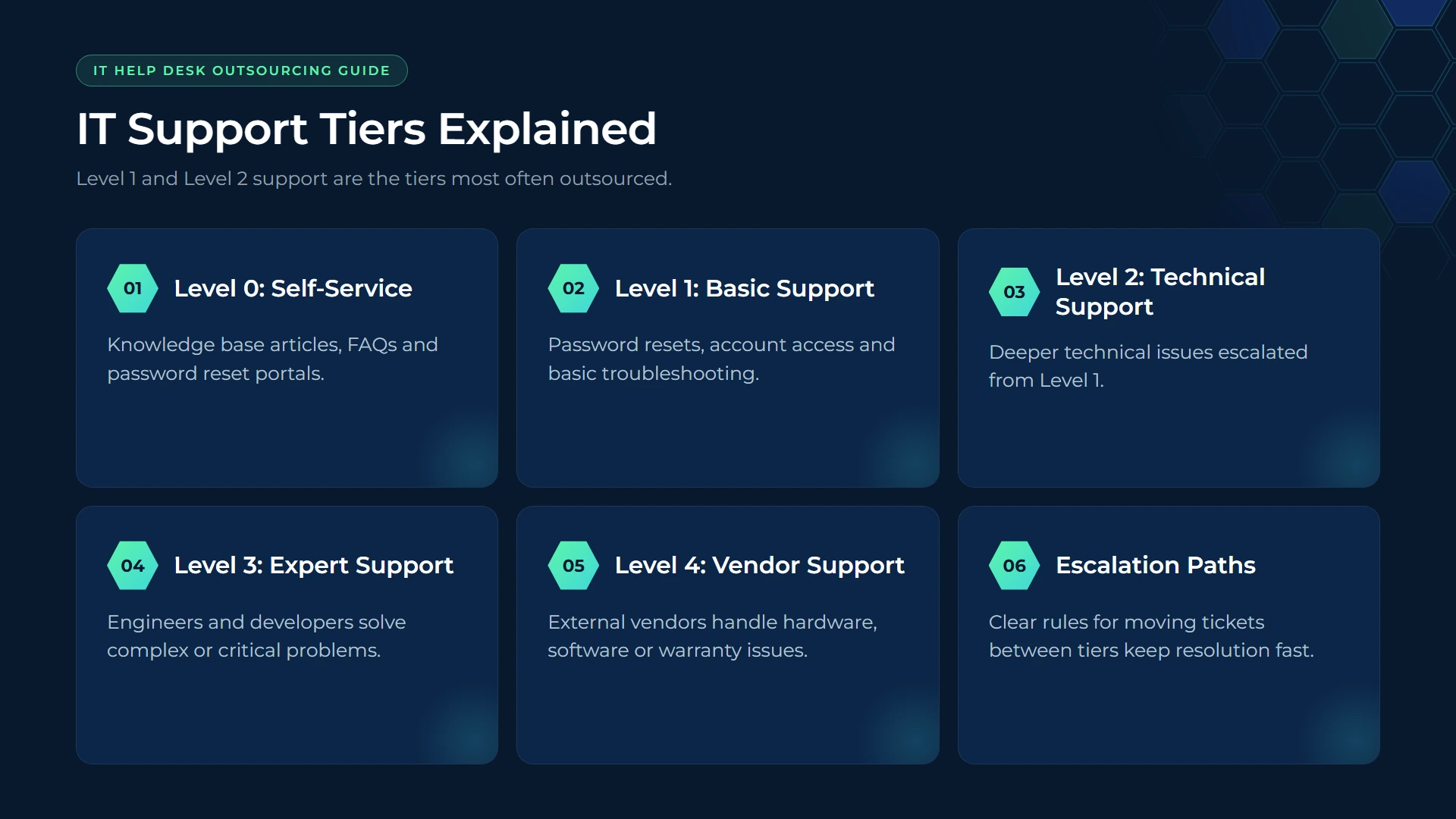
Support is split by complexity: tier-1 (basic troubleshooting), tier-2 (more technical issues), and tier-3 (specialist or engineering-level problems). Some businesses outsource only tier-1, keeping tiers 2 and 3 in-house where domain knowledge matters most.

Strengthen IT Help Desk Support with NeoWork

IT help desk outsourcing helps companies manage recurring user requests, troubleshooting, ticket handling, and technical support without expanding every internal support role. At NeoWork, we provide remote teammates who can support help desk operations within your existing systems and service workflows. We handle recruitment, benefits, training, and ongoing engagement, while our teammates follow your tools, procedures, and daily priorities. Our 91% annualized teammate retention rate and 3.2% candidate selectivity rate reflect our focus on selective hiring and longer-term team stability.

Our IT help desk outsourcing model offers:

  • help desk and technical support
  • integration with your tools and processes
  • recruitment and ongoing teammate support

Contact NeoWork to add IT help desk capacity that fits your existing support operations.

How Much Does IT Help Desk Outsourcing Cost?

Pricing varies widely depending on coverage hours, ticket volume, and how much complexity gets outsourced. Most providers use one of a few common pricing structures, and it's worth understanding each before requesting quotes.

Pricing Model

How It Works

Best For

Per-user, per-month

Flat fee per employee covered, regardless of ticket volume

Predictable budgeting, stable headcount

Per-ticket

Billed based on number of tickets resolved

Low or seasonal support volume

Tiered packages

Bundled support levels (basic, standard, premium) with set features

Businesses wanting predictable scope and cost

Block-hour / retainer

Prepaid block of support hours used as needed

Occasional or project-based support needs

As a general guideline, per-user pricing for standard business-hours support commonly lands in the range of $20-$75 per user per month, with 24/7 coverage and advanced security services pushing that higher. Actual rates depend heavily on region, SLA terms, and the provider's scope — always check a provider's official pricing page for current numbers rather than relying on published averages.
Benefits of Outsourcing the Help Desk

Beyond the obvious cost argument, outsourcing tends to deliver a few benefits that only become obvious after implementation.

  • Improved first-response and resolution times, since dedicated agents aren't juggling unrelated IT projects.
  • Access to broader expertise than most internal teams can afford to hire directly, especially around security tooling.
  • Better reporting and metrics, since most providers run mature ticketing platforms with built-in analytics.
  • Reduced burnout on internal IT staff who no longer absorb every minor request.
  • Business continuity during staff turnover, vacations, or sudden spikes in ticket volume.

Risks and Downsides to Weigh

Outsourcing isn't a magic fix, and pretending otherwise sets expectations up for failure. A few risks come up consistently.

  • Loss of institutional knowledge. External agents won't automatically understand internal systems, naming conventions, or company-specific quirks — that has to be documented and transferred deliberately.
  • Security and data access concerns. Giving a third party access to credentials, systems, and sensitive data raises the stakes on vendor security practices. This is where cybersecurity due diligence becomes non-negotiable, not optional.
  • Communication friction. Time zone differences, language barriers, or simply a less personal touch can frustrate employees used to walking down the hall to IT.
  • Vendor lock-in. Switching providers later can be disruptive if contracts, tools, and documentation aren't structured with portability in mind from day one.

How to Choose the Right Provider

Here's the thing though — most outsourcing disappointments trace back to a rushed vendor selection, not the concept of outsourcing itself. A structured evaluation process catches problems before they become expensive.

Questions to Ask Every Candidate

  1. What are the guaranteed response and resolution times, and are they backed by a formal SLA with penalties?
  2. How is data security handled — encryption, access controls, compliance certifications?
  3. What ticketing platform do they use, and can reporting integrate with existing systems?
  4. What does onboarding and knowledge transfer actually look like in the first 30-60 days?
  5. Can coverage scale up or down without renegotiating the entire contract?
  6. What happens if the relationship ends — how is data and documentation handed back?

Fully Outsourced vs. Co-Managed: Quick Comparison

Factor

Fully Outsourced

Co-Managed

Internal IT staff needed

Minimal or none

Yes, for tier-2/3 and strategy

Cost

Lower overall overhead

Moderate, blends internal + vendor cost

Control over operations

Lower

Higher

Best fit

Small businesses, startups

Mid-size to enterprise with existing IT

Most mid-sized organizations tend to gravitate toward a co-managed setup since it balances cost savings with retained control over the systems that matter most. Smaller businesses without any internal IT staff often find a fully outsourced model simpler and more affordable than building a department from scratch.
Best Practices for a Successful Transition

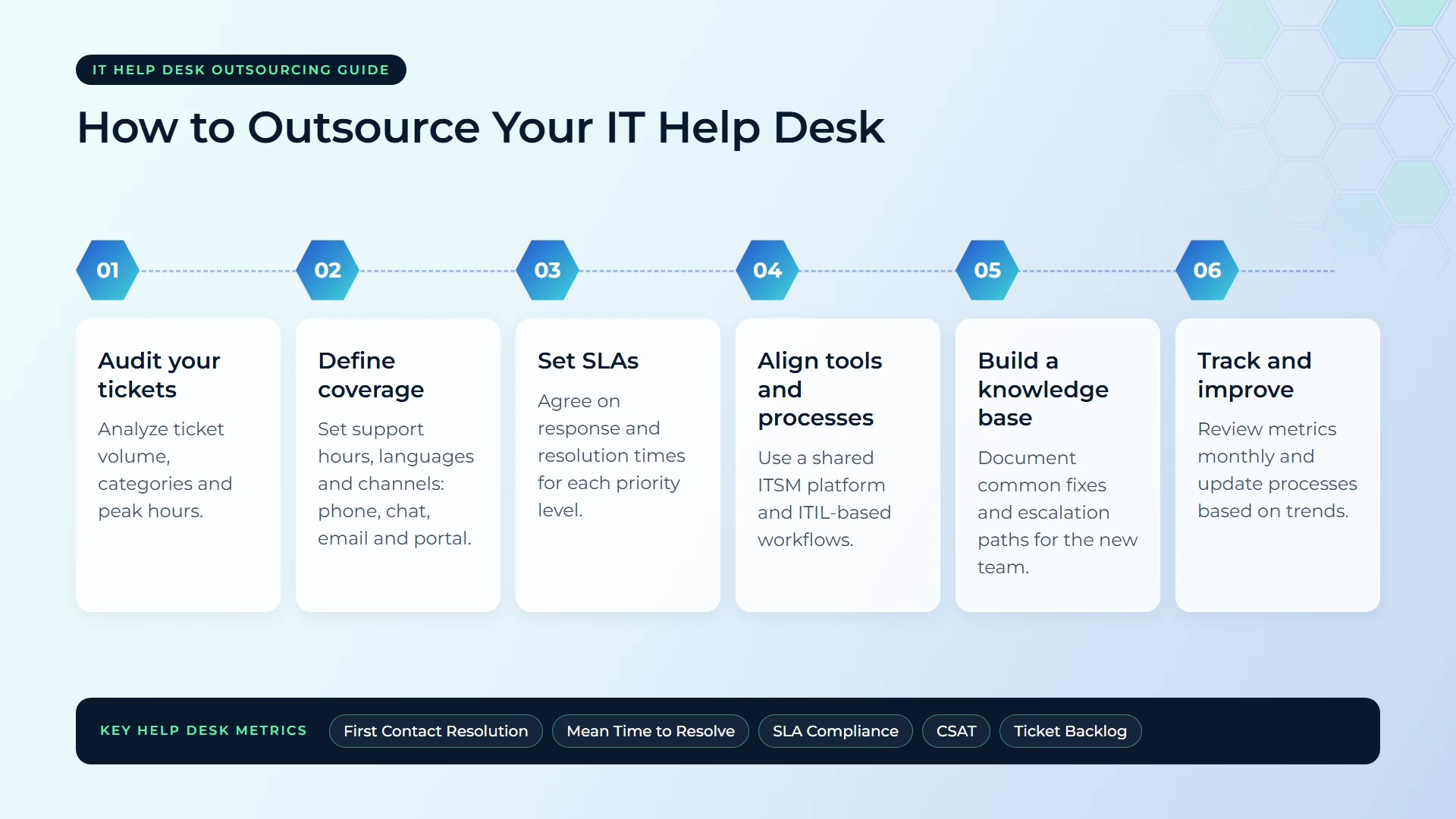
Switching from in-house to outsourced (or adding outsourcing on top of existing IT) goes smoother when a few basics are handled upfront.

  • Document everything first. Processes, common issues, and system quirks need to exist somewhere other than one employee's head.
  • Start with a pilot. Testing the relationship on a subset of users or ticket types before a full rollout limits the blast radius of early mistakes.
  • Set measurable SLAs. Response time, resolution time, and customer satisfaction scores should all be written into the contract, not assumed.
  • Communicate the change internally. Employees adapt faster when they know what's changing and why, rather than discovering a new support number by accident.
  • Review performance regularly. Quarterly check-ins against SLA metrics keep the provider accountable long after the honeymoon period ends.

FAQ: IT Help Desk Outsourcing

Is outsourcing the help desk cheaper than hiring in-house?

Usually, yes — outsourcing avoids the overhead of salaries, benefits, training, and tooling that come with full-time hires. That said, savings depend heavily on ticket volume and the scope of services included in the contract.

Will employees notice a drop in support quality?

Not if the transition is managed well. Clear documentation, a solid pilot period, and a provider with strong SLAs usually keep — or improve — the experience employees already have.

Can a company outsource only part of its help desk?

Yes. Many businesses outsource tier-1 support only, keeping tier-2 and tier-3 issues in-house where deeper system knowledge matters most. This hybrid approach is common and often a smart middle ground.

How long does it take to set up an outsourced help desk?

Onboarding timelines vary, but most providers need somewhere between 30 and 90 days to fully document systems, train agents, and integrate ticketing tools before a full handoff.

What happens to data security when outsourcing support?

A reputable provider should carry relevant security certifications, use encrypted access controls, and sign clear data-handling agreements. This should be verified before signing any contract, not assumed after the fact.

Is help desk outsourcing only for small businesses?

No. Enterprises use outsourcing too, often through co-managed models that blend an internal IT team with an external provider handling high-volume tier-1 tickets.

What's the biggest mistake companies make when outsourcing?

Skipping the documentation and pilot phase. Jumping straight to a full rollout without testing the relationship first tends to surface problems at the worst possible scale.

Final Thoughts

IT help desk outsourcing isn't a one-size-fits-all decision, but for most growing businesses it solves a real problem: too many tickets, not enough hands, and internal IT stretched thin across support and strategy. The companies that get the most value out of it treat vendor selection seriously, set clear SLAs from day one, and keep security at the center of every conversation.

Before signing anything, run the numbers against current internal support costs, request a trial period from any shortlisted provider, and check their security credentials directly rather than taking a sales pitch at face value. Done carefully, outsourcing the help desk turns a reactive cost center into a predictable, measurable part of the business.

Topics
No items found.

IT Help Desk Outsourcing Guide: Costs, Models & How to Choose (2026)

Paper
Calendar Icon
Oct 4, 2026
Ann

Quick Summary: IT help desk outsourcing means hiring a third-party provider to handle end-user technical support, from password resets to ticket escalation, usually billed per user or per ticket. Done right, it cuts support costs by 30-50%, improves response times, and frees internal IT staff for strategic projects. The key to success lies in choosing the right pricing model, setting clear SLAs, and vetting a provider's security practices before signing anything.

Most IT teams hit the same wall eventually: tickets pile up faster than anyone can resolve them, and the people best equipped to drive strategic projects spend their mornings resetting passwords instead. That's usually the moment "outsourcing the help desk" stops being a theoretical idea and starts looking like a real option.

This guide breaks down what IT help desk outsourcing actually involves, what it costs in 2026, which models fit which businesses, and how to avoid the mistakes that turn a cost-saving move into a support nightmare. No fluff, just the practical stuff decision-makers actually need before they call a vendor.

What Is IT Help Desk Outsourcing?

IT help desk outsourcing is the practice of contracting an external provider to manage some or all of a company's first-line technical support. Instead of hiring, training, and scheduling an in-house support team, a business pays a specialist vendor to staff that function — often around the clock.

The outsourced team typically handles the repetitive, high-volume stuff: password resets, software installs, printer issues, account lockouts, basic troubleshooting. More advanced providers also take on network monitoring, patch management, and even cybersecurity incident response, depending on the contract.

In practice, the provider becomes the "one number to call" for employees. Tickets get logged, triaged, and either resolved on the spot or escalated to the client's internal team or a specialized engineer, all against a written response-time commitment.

Why Companies Outsource Their Help Desk

The reasons tend to cluster around a handful of recurring business pressures. Growth outpaces hiring. Budgets tighten. Security expectations rise faster than internal expertise can keep up. Outsourcing addresses several of these at once.

  • Cost control: Avoiding full-time salaries, benefits, and training costs for a function that doesn't need to live in-house.
  • 24/7 coverage: Round-the-clock support without asking internal staff to work nights and weekends.
  • Faster response times: Dedicated teams with ticketing tools built specifically for support, not improvised workflows.
  • Scalability: Adding or removing support capacity as headcount or seasonal demand shifts, without a hiring cycle.
  • Freeing internal IT: Letting in-house engineers focus on infrastructure, projects, and strategy instead of tier-1 tickets.

None of this means outsourcing is automatically the right call for every business. It's a trade-off, and the next sections dig into exactly what that trade-off looks like.

Outsourcing Models: Which One Fits?

Not all outsourced help desks look the same. The structure a business chooses shapes cost, control, and how quickly issues actually get resolved.

Fully Outsourced Help Desk

The provider owns the entire support function — tier-1 through tier-3 — with no internal IT support staff at all. This suits smaller companies without an internal IT department, or organizations that want IT treated purely as a managed utility.

Co-Managed (Hybrid) Help Desk

The provider handles tier-1 and overflow tickets, while an internal team manages strategic projects, specialized systems, and anything requiring deep institutional knowledge. This is the most common setup for mid-sized companies that already have some IT staff but need more hands.

Tiered Escalation Model

Support is split by complexity: tier-1 (basic troubleshooting), tier-2 (more technical issues), and tier-3 (specialist or engineering-level problems). Some businesses outsource only tier-1, keeping tiers 2 and 3 in-house where domain knowledge matters most.

Strengthen IT Help Desk Support with NeoWork

IT help desk outsourcing helps companies manage recurring user requests, troubleshooting, ticket handling, and technical support without expanding every internal support role. At NeoWork, we provide remote teammates who can support help desk operations within your existing systems and service workflows. We handle recruitment, benefits, training, and ongoing engagement, while our teammates follow your tools, procedures, and daily priorities. Our 91% annualized teammate retention rate and 3.2% candidate selectivity rate reflect our focus on selective hiring and longer-term team stability.

Our IT help desk outsourcing model offers:

  • help desk and technical support
  • integration with your tools and processes
  • recruitment and ongoing teammate support

Contact NeoWork to add IT help desk capacity that fits your existing support operations.

How Much Does IT Help Desk Outsourcing Cost?

Pricing varies widely depending on coverage hours, ticket volume, and how much complexity gets outsourced. Most providers use one of a few common pricing structures, and it's worth understanding each before requesting quotes.

Pricing Model

How It Works

Best For

Per-user, per-month

Flat fee per employee covered, regardless of ticket volume

Predictable budgeting, stable headcount

Per-ticket

Billed based on number of tickets resolved

Low or seasonal support volume

Tiered packages

Bundled support levels (basic, standard, premium) with set features

Businesses wanting predictable scope and cost

Block-hour / retainer

Prepaid block of support hours used as needed

Occasional or project-based support needs

As a general guideline, per-user pricing for standard business-hours support commonly lands in the range of $20-$75 per user per month, with 24/7 coverage and advanced security services pushing that higher. Actual rates depend heavily on region, SLA terms, and the provider's scope — always check a provider's official pricing page for current numbers rather than relying on published averages.

Benefits of Outsourcing the Help Desk

Beyond the obvious cost argument, outsourcing tends to deliver a few benefits that only become obvious after implementation.

  • Improved first-response and resolution times, since dedicated agents aren't juggling unrelated IT projects.
  • Access to broader expertise than most internal teams can afford to hire directly, especially around security tooling.
  • Better reporting and metrics, since most providers run mature ticketing platforms with built-in analytics.
  • Reduced burnout on internal IT staff who no longer absorb every minor request.
  • Business continuity during staff turnover, vacations, or sudden spikes in ticket volume.

Risks and Downsides to Weigh

Outsourcing isn't a magic fix, and pretending otherwise sets expectations up for failure. A few risks come up consistently.

  • Loss of institutional knowledge. External agents won't automatically understand internal systems, naming conventions, or company-specific quirks — that has to be documented and transferred deliberately.
  • Security and data access concerns. Giving a third party access to credentials, systems, and sensitive data raises the stakes on vendor security practices. This is where cybersecurity due diligence becomes non-negotiable, not optional.
  • Communication friction. Time zone differences, language barriers, or simply a less personal touch can frustrate employees used to walking down the hall to IT.
  • Vendor lock-in. Switching providers later can be disruptive if contracts, tools, and documentation aren't structured with portability in mind from day one.

How to Choose the Right Provider

Here's the thing though — most outsourcing disappointments trace back to a rushed vendor selection, not the concept of outsourcing itself. A structured evaluation process catches problems before they become expensive.

Questions to Ask Every Candidate

  1. What are the guaranteed response and resolution times, and are they backed by a formal SLA with penalties?
  2. How is data security handled — encryption, access controls, compliance certifications?
  3. What ticketing platform do they use, and can reporting integrate with existing systems?
  4. What does onboarding and knowledge transfer actually look like in the first 30-60 days?
  5. Can coverage scale up or down without renegotiating the entire contract?
  6. What happens if the relationship ends — how is data and documentation handed back?

Fully Outsourced vs. Co-Managed: Quick Comparison

Factor

Fully Outsourced

Co-Managed

Internal IT staff needed

Minimal or none

Yes, for tier-2/3 and strategy

Cost

Lower overall overhead

Moderate, blends internal + vendor cost

Control over operations

Lower

Higher

Best fit

Small businesses, startups

Mid-size to enterprise with existing IT

Most mid-sized organizations tend to gravitate toward a co-managed setup since it balances cost savings with retained control over the systems that matter most. Smaller businesses without any internal IT staff often find a fully outsourced model simpler and more affordable than building a department from scratch.

Best Practices for a Successful Transition

Switching from in-house to outsourced (or adding outsourcing on top of existing IT) goes smoother when a few basics are handled upfront.

  • Document everything first. Processes, common issues, and system quirks need to exist somewhere other than one employee's head.
  • Start with a pilot. Testing the relationship on a subset of users or ticket types before a full rollout limits the blast radius of early mistakes.
  • Set measurable SLAs. Response time, resolution time, and customer satisfaction scores should all be written into the contract, not assumed.
  • Communicate the change internally. Employees adapt faster when they know what's changing and why, rather than discovering a new support number by accident.
  • Review performance regularly. Quarterly check-ins against SLA metrics keep the provider accountable long after the honeymoon period ends.

FAQ: IT Help Desk Outsourcing

Is outsourcing the help desk cheaper than hiring in-house?

Usually, yes — outsourcing avoids the overhead of salaries, benefits, training, and tooling that come with full-time hires. That said, savings depend heavily on ticket volume and the scope of services included in the contract.

Will employees notice a drop in support quality?

Not if the transition is managed well. Clear documentation, a solid pilot period, and a provider with strong SLAs usually keep — or improve — the experience employees already have.

Can a company outsource only part of its help desk?

Yes. Many businesses outsource tier-1 support only, keeping tier-2 and tier-3 issues in-house where deeper system knowledge matters most. This hybrid approach is common and often a smart middle ground.

How long does it take to set up an outsourced help desk?

Onboarding timelines vary, but most providers need somewhere between 30 and 90 days to fully document systems, train agents, and integrate ticketing tools before a full handoff.

What happens to data security when outsourcing support?

A reputable provider should carry relevant security certifications, use encrypted access controls, and sign clear data-handling agreements. This should be verified before signing any contract, not assumed after the fact.

Is help desk outsourcing only for small businesses?

No. Enterprises use outsourcing too, often through co-managed models that blend an internal IT team with an external provider handling high-volume tier-1 tickets.

What's the biggest mistake companies make when outsourcing?

Skipping the documentation and pilot phase. Jumping straight to a full rollout without testing the relationship first tends to surface problems at the worst possible scale.

Final Thoughts

IT help desk outsourcing isn't a one-size-fits-all decision, but for most growing businesses it solves a real problem: too many tickets, not enough hands, and internal IT stretched thin across support and strategy. The companies that get the most value out of it treat vendor selection seriously, set clear SLAs from day one, and keep security at the center of every conversation.

Before signing anything, run the numbers against current internal support costs, request a trial period from any shortlisted provider, and check their security credentials directly rather than taking a sales pitch at face value. Done carefully, outsourcing the help desk turns a reactive cost center into a predictable, measurable part of the business.

Topics

No items found.
Blue gradient banner with rounded corners at the top.
CTA Hexagon LeftCTA Hexagon LeftCTA Hexagon RightCTA Hexagon Right Mobile

Navigate the shadows of tech leadership – all while enjoying the comfort food that binds us all.

CTA Hexagon LeftCTA Hexagon LeftCTA Hexagon RightCTA Hexagon Right Mobile

Book a consultation

Build your team with NeoWork

Talk to us about how we staff and manage high-performing remote teams for companies like yours.