

.avif)
.avif)

Game UX Design Outsourcing Guide 2026: Expert Tips


.svg)

Game UX design outsourcing enables studios to access specialized interface expertise while managing costs and timelines effectively. Success depends on selecting partners with real game experience, establishing clear technical specifications, and implementing structured feedback loops throughout production.
Retention is what every game ultimately comes down to. And nothing kills retention faster than a painful interface.
A combat loop can be exceptional. The world design can be stunning. But if players can't tap the equip button quickly, or if the HUD pulls their attention during a critical moment, they disengage. The interface is the layer between a player's intention and the game's response.
When it breaks, everything breaks.
That's why game UX design outsourcing has become a strategic priority in 2026. With rising production costs, tighter deadlines, and the need for specialized skills, studios of all sizes are looking for reliable partners who understand the specific demands of interactive interface design.
Here's the thing though—game UI is a specific discipline, and general experience doesn't transfer automatically. This guide covers what works when outsourcing game UX design, from partner selection to production management.
Why Studios Outsource Game UX Design
Outsourcing has become a prevalent strategy in the game development industry, enabling studios to manage costs and access specialized skills. However, it introduces challenges such as quality control and coordination issues.
The reasons studios turn to external UX partners fall into three categories: access to expertise, cost management, and production flexibility.
Mobile game development particularly benefits from outsourcing. Interface design for touch-based interaction requires specific knowledge about tap zones, gesture recognition, and screen real estate optimization that not every in-house team possesses.
But wait. Cost alone isn't the driving factor. Many studios outsource to scale production rapidly when player engagement demands more content. Others need specialized expertise for a specific platform or genre they haven't tackled before.
The Real Trade-offs: Outsourcing vs In-House
In-house teams offer direct communication and cultural alignment. Outsourced partners provide specialized skills and scalability without long-term employment commitments.
The decision isn't binary. Many successful studios use hybrid models—maintaining core UX design in-house while outsourcing specific interface elements, animations, or platform adaptations.

Game UX Design with NeoWork
Great game experiences require intuitive UX and player-focused design. NeoWork provides remote UX designers who work closely with your team to create engaging interfaces.
Focus areas:
- wireframing and prototyping for games
- user interface and interaction design
- playtesting and user feedback integration
- cross-platform consistency
NeoWork can augment your team or manage complete UX projects. Start your game UX design outsourcing with NeoWork today to deliver better player experiences.
What to Look for in a Game UX Partner
Not all design studios understand game interfaces. The partner selection process determines whether outsourcing succeeds or becomes a budget drain.
Real game experience matters more than portfolio size. A strong game UI/UX partner understands how an interface responds to engine state. They think about localization from the start, knowing that German text runs roughly 30 percent longer than English..
Essential Partner Criteria
Look for studios with shipped titles in the target platform. Mobile game UI differs fundamentally from console or PC interfaces. Touch targets, screen sizes, and interaction patterns vary dramatically.
Portfolio evaluation should focus on functionality, not just aesthetics. Beautiful mockups mean nothing if the interface doesn't work under real gameplay conditions.
Technical capability separates amateur from professional partners. Can they deliver implementation-ready files? Do they understand Unity UI, Unreal's UMG, or the target engine's requirements?
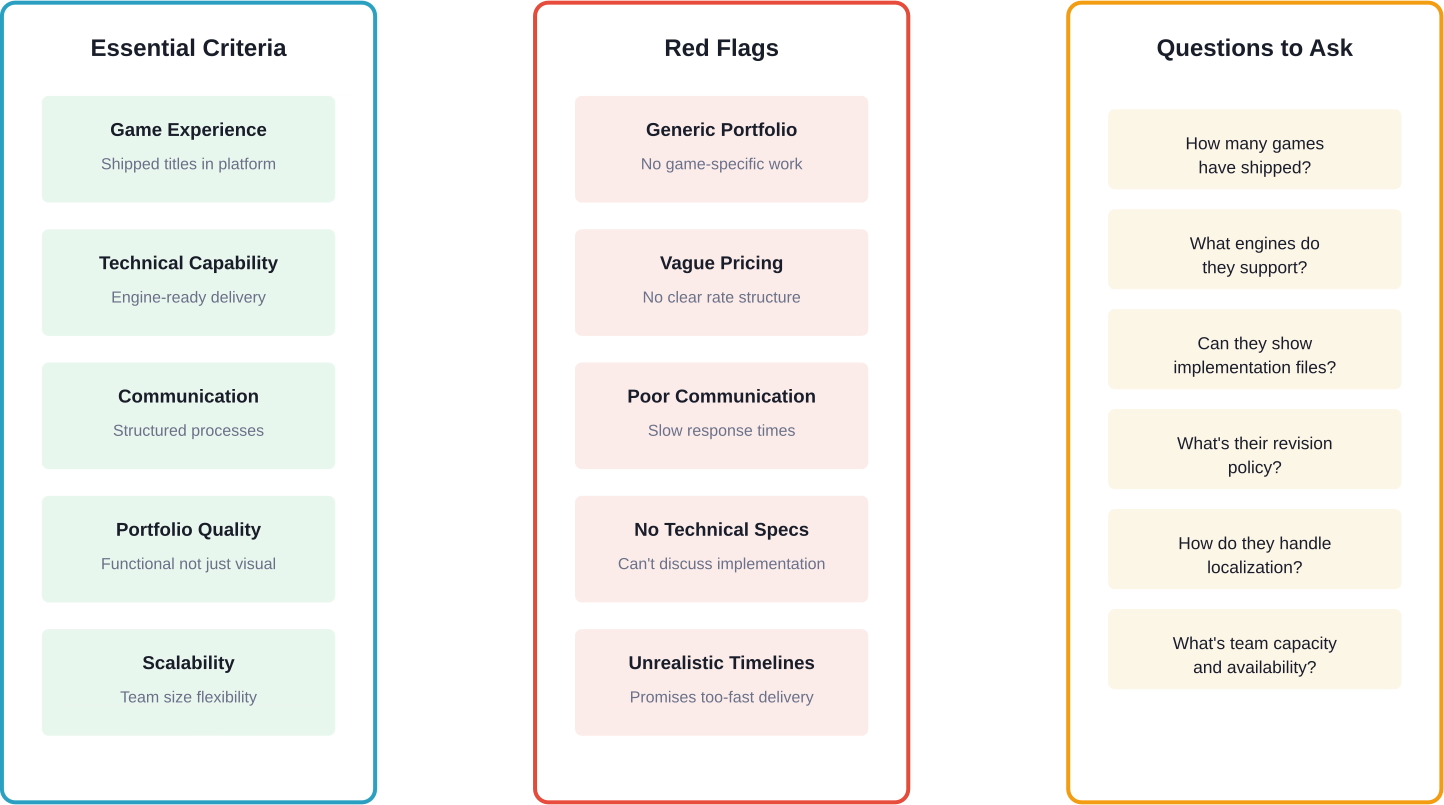
Communication infrastructure reveals operational maturity. Established studios use project management tools, maintain regular check-ins, and provide structured feedback formats. If initial conversations feel chaotic, production will be worse.
Game UX Outsourcing Costs and Timelines
Pricing varies dramatically based on scope, complexity, and partner location. Understanding market rates prevents both overpaying and selecting partners who can't deliver quality.
Typical Cost Ranges for Game UI/UX Work
Market rates reflect mid-quality work from experienced studios, not the cheapest options on freelance platforms. Here's what production costs look like in 2026:
These ranges reflect 2026 market conditions for studios with proven game experience. Rates fluctuate based on partner location, timeline urgency, and technical requirements.
Timeline Expectations
Quality game UX design can't be rushed. A single mobile screen typically requires 3-5 days including revisions. Complete interface systems for mobile games take 4-8 weeks depending on scope.
Waiting until final delivery to provide feedback leads to budget overruns and timeline delays. Structured review cycles at concept, draft, and final stages prevent rework and keep production on schedule.
How to Manage an Outsourced Game UX Pipeline
The difference between successful outsourcing and disaster comes down to process. Clear specifications, structured feedback, and regular communication determine outcomes.
Define Technical Requirements Before Starting
Vague briefs produce unusable work. Technical specifications must be explicit and documented before production begins.
Providing reference materials accelerates production. Competitor examples, mood boards, and existing game footage give partners clear direction without micromanagement.
Establish Feedback Loops
Rather than subjective comments like "make it better," feedback should be specific and actionable. Use formats like: "reduce button size by 15%," "adjust hue 10 degrees warmer," "increase contrast ratio to meet WCAG standards."
Milestone-based reviews prevent scope creep. Approving concepts before moving to high-fidelity design ensures alignment early when changes cost less.
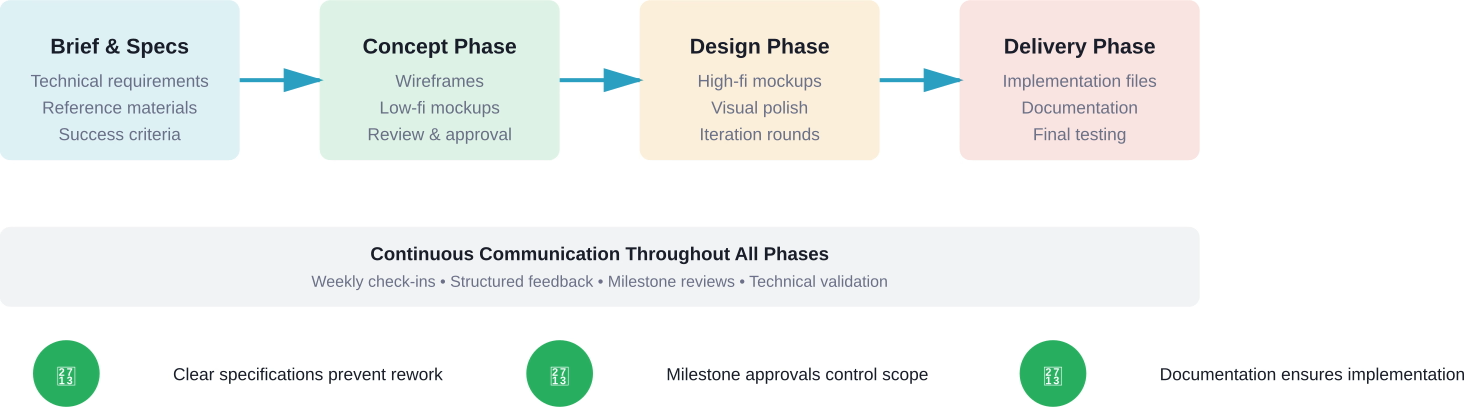
Synchronous communication matters less than consistent communication. Weekly status updates work better than sporadic emergency calls. Established rhythms keep everyone aligned without constant interruptions.
Common Outsourcing Challenges and Solutions
Even with careful planning, game UX outsourcing presents recurring challenges. Knowing them in advance allows proactive management.
Quality Control Issues
The problem: Delivered interfaces look good in static mockups but break during gameplay or don't match the established art style.
The solution: Provide style guides, asset templates, and technical constraints upfront. Request work-in-progress builds for validation before final delivery. Testing interfaces in the actual game engine reveals issues mockups hide.
Communication Gaps
The problem: Time zone differences, language barriers, or unclear expectations create misunderstandings that delay production.
The solution: Document everything. Use visual references. Record video feedback when explaining interaction issues. Establish primary contact points rather than routing feedback through multiple team members.
Scope Creep
The problem: "Just one more screen" or "quick changes" accumulate into major scope expansions without budget adjustments.
The solution: Define change request processes before starting. Separate included revisions from out-of-scope additions. Track all modifications to prevent undocumented work from derailing timelines.
Best Practices for Successful Game UX Outsourcing
These strategies consistently separate successful outsourcing relationships from problematic ones.
- Start with a pilot project. Test the partnership on a smaller scope before committing to full production. A single feature or screen set reveals how the studio works without major risk.
- Build component libraries, not just screens. Modular UI systems scale better than custom designs for every interface. Request reusable components that adapt across different contexts.
- Plan for iteration. First versions rarely ship unchanged. Build revision rounds into timelines and budgets from the start. Rushed "final" delivery with no iteration time produces mediocre results.
- Validate technical implementation early. Beautiful designs that don't work in-engine waste time and money. Test file formats, layer structures, and asset specifications in the target platform before completing full production.
- Document decisions. When changes occur, record why. Future team members—or your future self—will need context about interface choices months later during production.
When to Outsource Game UX Design
Not every situation benefits from outsourcing. Timing and project characteristics determine when external partners add value.
Outsourcing works well when production demands exceed internal capacity, when specialized platform expertise is needed, or when rapid scaling is required. Mobile game UI, in particular, benefits from partners who understand touch interaction patterns and platform-specific conventions.
Early production stages often work better in-house where rapid iteration and close collaboration matter most. Once core systems stabilize, outsourcing specific interface elements or content expansion becomes more effective.
Platform ports represent ideal outsourcing opportunities. Adapting PC interfaces for mobile or console requires platform-specific knowledge that specialized partners possess.
Measuring Outsourcing Success
How do studios know if outsourcing actually worked? Clear metrics prevent subjective evaluation and identify improvement opportunities.
Cost efficiency compares delivered quality against budget. Did the partnership cost less than hiring full-time specialists? Were there hidden costs in communication overhead or rework?
Timeline adherence tracks whether partners delivered on schedule. Consistent delays indicate process problems or unrealistic planning.
Quality metrics assess usability and player reception. Interface analytics reveal friction points—high abandonment rates on specific screens or excessive time completing tasks signal UX problems regardless of visual polish.
Player retention provides the ultimate measure. Interface improvements should correlate with better engagement metrics and reduced early churn.
Finding the Right Game UX Outsourcing Partner
Partner discovery channels vary in effectiveness. Portfolio platforms showcase work but provide little operational insight. Direct referrals from other developers offer reliable vetting.
Industry events and conferences facilitate face-to-face evaluation. Conversations reveal communication style and technical depth better than websites.
Test projects remain the most reliable assessment method. Small paid trials demonstrate actual capabilities without major commitment.
Check the official websites and portfolios of potential partners for current availability, pricing structures, and case studies. Market conditions shift rapidly—what worked in 2025 may not reflect 2026 realities.
Conclusion
Game UX design outsourcing succeeds when studios select partners with real game experience, establish clear technical specifications, and implement structured feedback processes. The interface sits between player intention and game response—when it works, players stay engaged. When it breaks, they leave.
Quality outsourcing isn't about finding the cheapest option. It's about finding partners who understand how interfaces function under real gameplay conditions, who deliver implementation-ready files, and who communicate consistently throughout production.
Start with clear requirements. Test partnerships on pilot projects. Document decisions. Measure results.
The right partner scales production capacity without sacrificing quality. The wrong one creates rework, delays, and budget overruns. Choose carefully.
Frequently Asked Questions
Topics
Game UX Design Outsourcing Guide 2026: Expert Tips

Game UX design outsourcing enables studios to access specialized interface expertise while managing costs and timelines effectively. Success depends on selecting partners with real game experience, establishing clear technical specifications, and implementing structured feedback loops throughout production.
Retention is what every game ultimately comes down to. And nothing kills retention faster than a painful interface.
A combat loop can be exceptional. The world design can be stunning. But if players can't tap the equip button quickly, or if the HUD pulls their attention during a critical moment, they disengage. The interface is the layer between a player's intention and the game's response.
When it breaks, everything breaks.
That's why game UX design outsourcing has become a strategic priority in 2026. With rising production costs, tighter deadlines, and the need for specialized skills, studios of all sizes are looking for reliable partners who understand the specific demands of interactive interface design.
Here's the thing though—game UI is a specific discipline, and general experience doesn't transfer automatically. This guide covers what works when outsourcing game UX design, from partner selection to production management.
Why Studios Outsource Game UX Design
Outsourcing has become a prevalent strategy in the game development industry, enabling studios to manage costs and access specialized skills. However, it introduces challenges such as quality control and coordination issues.
The reasons studios turn to external UX partners fall into three categories: access to expertise, cost management, and production flexibility.
Mobile game development particularly benefits from outsourcing. Interface design for touch-based interaction requires specific knowledge about tap zones, gesture recognition, and screen real estate optimization that not every in-house team possesses.
But wait. Cost alone isn't the driving factor. Many studios outsource to scale production rapidly when player engagement demands more content. Others need specialized expertise for a specific platform or genre they haven't tackled before.
The Real Trade-offs: Outsourcing vs In-House
In-house teams offer direct communication and cultural alignment. Outsourced partners provide specialized skills and scalability without long-term employment commitments.
The decision isn't binary. Many successful studios use hybrid models—maintaining core UX design in-house while outsourcing specific interface elements, animations, or platform adaptations.
Game UX Design with NeoWork
Great game experiences require intuitive UX and player-focused design. NeoWork provides remote UX designers who work closely with your team to create engaging interfaces.
Focus areas:
- wireframing and prototyping for games
- user interface and interaction design
- playtesting and user feedback integration
- cross-platform consistency
NeoWork can augment your team or manage complete UX projects. Start your game UX design outsourcing with NeoWork today to deliver better player experiences.
What to Look for in a Game UX Partner
Not all design studios understand game interfaces. The partner selection process determines whether outsourcing succeeds or becomes a budget drain.
Real game experience matters more than portfolio size. A strong game UI/UX partner understands how an interface responds to engine state. They think about localization from the start, knowing that German text runs roughly 30 percent longer than English..
Essential Partner Criteria
Look for studios with shipped titles in the target platform. Mobile game UI differs fundamentally from console or PC interfaces. Touch targets, screen sizes, and interaction patterns vary dramatically.
Portfolio evaluation should focus on functionality, not just aesthetics. Beautiful mockups mean nothing if the interface doesn't work under real gameplay conditions.
Technical capability separates amateur from professional partners. Can they deliver implementation-ready files? Do they understand Unity UI, Unreal's UMG, or the target engine's requirements?
Communication infrastructure reveals operational maturity. Established studios use project management tools, maintain regular check-ins, and provide structured feedback formats. If initial conversations feel chaotic, production will be worse.
Game UX Outsourcing Costs and Timelines
Pricing varies dramatically based on scope, complexity, and partner location. Understanding market rates prevents both overpaying and selecting partners who can't deliver quality.
Typical Cost Ranges for Game UI/UX Work
Market rates reflect mid-quality work from experienced studios, not the cheapest options on freelance platforms. Here's what production costs look like in 2026:
These ranges reflect 2026 market conditions for studios with proven game experience. Rates fluctuate based on partner location, timeline urgency, and technical requirements.
Timeline Expectations
Quality game UX design can't be rushed. A single mobile screen typically requires 3-5 days including revisions. Complete interface systems for mobile games take 4-8 weeks depending on scope.
Waiting until final delivery to provide feedback leads to budget overruns and timeline delays. Structured review cycles at concept, draft, and final stages prevent rework and keep production on schedule.
How to Manage an Outsourced Game UX Pipeline
The difference between successful outsourcing and disaster comes down to process. Clear specifications, structured feedback, and regular communication determine outcomes.
Define Technical Requirements Before Starting
Vague briefs produce unusable work. Technical specifications must be explicit and documented before production begins.
Providing reference materials accelerates production. Competitor examples, mood boards, and existing game footage give partners clear direction without micromanagement.
Establish Feedback Loops
Rather than subjective comments like "make it better," feedback should be specific and actionable. Use formats like: "reduce button size by 15%," "adjust hue 10 degrees warmer," "increase contrast ratio to meet WCAG standards."
Milestone-based reviews prevent scope creep. Approving concepts before moving to high-fidelity design ensures alignment early when changes cost less.
Synchronous communication matters less than consistent communication. Weekly status updates work better than sporadic emergency calls. Established rhythms keep everyone aligned without constant interruptions.
Common Outsourcing Challenges and Solutions
Even with careful planning, game UX outsourcing presents recurring challenges. Knowing them in advance allows proactive management.
Quality Control Issues
The problem: Delivered interfaces look good in static mockups but break during gameplay or don't match the established art style.
The solution: Provide style guides, asset templates, and technical constraints upfront. Request work-in-progress builds for validation before final delivery. Testing interfaces in the actual game engine reveals issues mockups hide.
Communication Gaps
The problem: Time zone differences, language barriers, or unclear expectations create misunderstandings that delay production.
The solution: Document everything. Use visual references. Record video feedback when explaining interaction issues. Establish primary contact points rather than routing feedback through multiple team members.
Scope Creep
The problem: "Just one more screen" or "quick changes" accumulate into major scope expansions without budget adjustments.
The solution: Define change request processes before starting. Separate included revisions from out-of-scope additions. Track all modifications to prevent undocumented work from derailing timelines.
Best Practices for Successful Game UX Outsourcing
These strategies consistently separate successful outsourcing relationships from problematic ones.
- Start with a pilot project. Test the partnership on a smaller scope before committing to full production. A single feature or screen set reveals how the studio works without major risk.
- Build component libraries, not just screens. Modular UI systems scale better than custom designs for every interface. Request reusable components that adapt across different contexts.
- Plan for iteration. First versions rarely ship unchanged. Build revision rounds into timelines and budgets from the start. Rushed "final" delivery with no iteration time produces mediocre results.
- Validate technical implementation early. Beautiful designs that don't work in-engine waste time and money. Test file formats, layer structures, and asset specifications in the target platform before completing full production.
- Document decisions. When changes occur, record why. Future team members—or your future self—will need context about interface choices months later during production.
When to Outsource Game UX Design
Not every situation benefits from outsourcing. Timing and project characteristics determine when external partners add value.
Outsourcing works well when production demands exceed internal capacity, when specialized platform expertise is needed, or when rapid scaling is required. Mobile game UI, in particular, benefits from partners who understand touch interaction patterns and platform-specific conventions.
Early production stages often work better in-house where rapid iteration and close collaboration matter most. Once core systems stabilize, outsourcing specific interface elements or content expansion becomes more effective.
Platform ports represent ideal outsourcing opportunities. Adapting PC interfaces for mobile or console requires platform-specific knowledge that specialized partners possess.
Measuring Outsourcing Success
How do studios know if outsourcing actually worked? Clear metrics prevent subjective evaluation and identify improvement opportunities.
Cost efficiency compares delivered quality against budget. Did the partnership cost less than hiring full-time specialists? Were there hidden costs in communication overhead or rework?
Timeline adherence tracks whether partners delivered on schedule. Consistent delays indicate process problems or unrealistic planning.
Quality metrics assess usability and player reception. Interface analytics reveal friction points—high abandonment rates on specific screens or excessive time completing tasks signal UX problems regardless of visual polish.
Player retention provides the ultimate measure. Interface improvements should correlate with better engagement metrics and reduced early churn.
Finding the Right Game UX Outsourcing Partner
Partner discovery channels vary in effectiveness. Portfolio platforms showcase work but provide little operational insight. Direct referrals from other developers offer reliable vetting.
Industry events and conferences facilitate face-to-face evaluation. Conversations reveal communication style and technical depth better than websites.
Test projects remain the most reliable assessment method. Small paid trials demonstrate actual capabilities without major commitment.
Check the official websites and portfolios of potential partners for current availability, pricing structures, and case studies. Market conditions shift rapidly—what worked in 2025 may not reflect 2026 realities.
Conclusion
Game UX design outsourcing succeeds when studios select partners with real game experience, establish clear technical specifications, and implement structured feedback processes. The interface sits between player intention and game response—when it works, players stay engaged. When it breaks, they leave.
Quality outsourcing isn't about finding the cheapest option. It's about finding partners who understand how interfaces function under real gameplay conditions, who deliver implementation-ready files, and who communicate consistently throughout production.
Start with clear requirements. Test partnerships on pilot projects. Document decisions. Measure results.
The right partner scales production capacity without sacrificing quality. The wrong one creates rework, delays, and budget overruns. Choose carefully.
Frequently Asked Questions
Topics
Related Blogs
Related Podcasts


.webp)
.webp)



