
.avif)
.avif)
Quick Summary: Help desk outsourcing means contracting an external provider to receive, log, troubleshoot, and resolve support tickets, either for your employees (an internal IT help desk) or for your customers (a technical support desk). The provider supplies trained support staff, ticket management processes, and reporting against agreed service levels. According to MetricNet benchmarks, the average net first level resolution rate for service desks is around 74%, which shows how much a well-run tier 1 team can solve before tickets climb to more expensive tiers. Most companies start by outsourcing tier 1, keep tier 3 with in-house engineers, and measure the provider on response time, first level resolution, and user satisfaction.
As a company grows, support tickets often outgrow the people answering them. Password resets and access requests pile up for internal IT, or customers wait days for help with setup and bugs. Engineers and product specialists end up spending their week on repetitive tickets instead of the projects they were hired for.
Outsourcing the help desk is one of the most common ways to fix that. Done well, it gives you longer coverage hours, faster first responses, and a cleaner escalation path, while your senior team handles only the tickets that need them.
What Is Help Desk Outsourcing?
Help desk outsourcing is the practice of delegating the intake, triage, and resolution of support requests to a third-party team. The outsourced help desk works through a ticketing system, follows documented troubleshooting steps and escalation rules, and is measured on response time, resolution rate, and user satisfaction.
There are two main types:
- Internal IT help desk: Supports your employees with password resets, account access, device setup, software installs, VPN issues, and onboarding or offboarding requests.
- Customer-facing technical support: Supports your customers with product setup, troubleshooting, bug reporting, how-to questions, and account issues, usually for software, SaaS, hardware, or connected devices.
Help desk and service desk are often used interchangeably. Strictly speaking, a service desk in ITIL terms is broader: it covers incident management plus service requests, change requests, and IT service management processes. A help desk focuses on solving user problems quickly.
Help Desk Support Tiers Explained
Most help desks organize work into tiers. Knowing which tiers to outsource is the most important scoping decision.
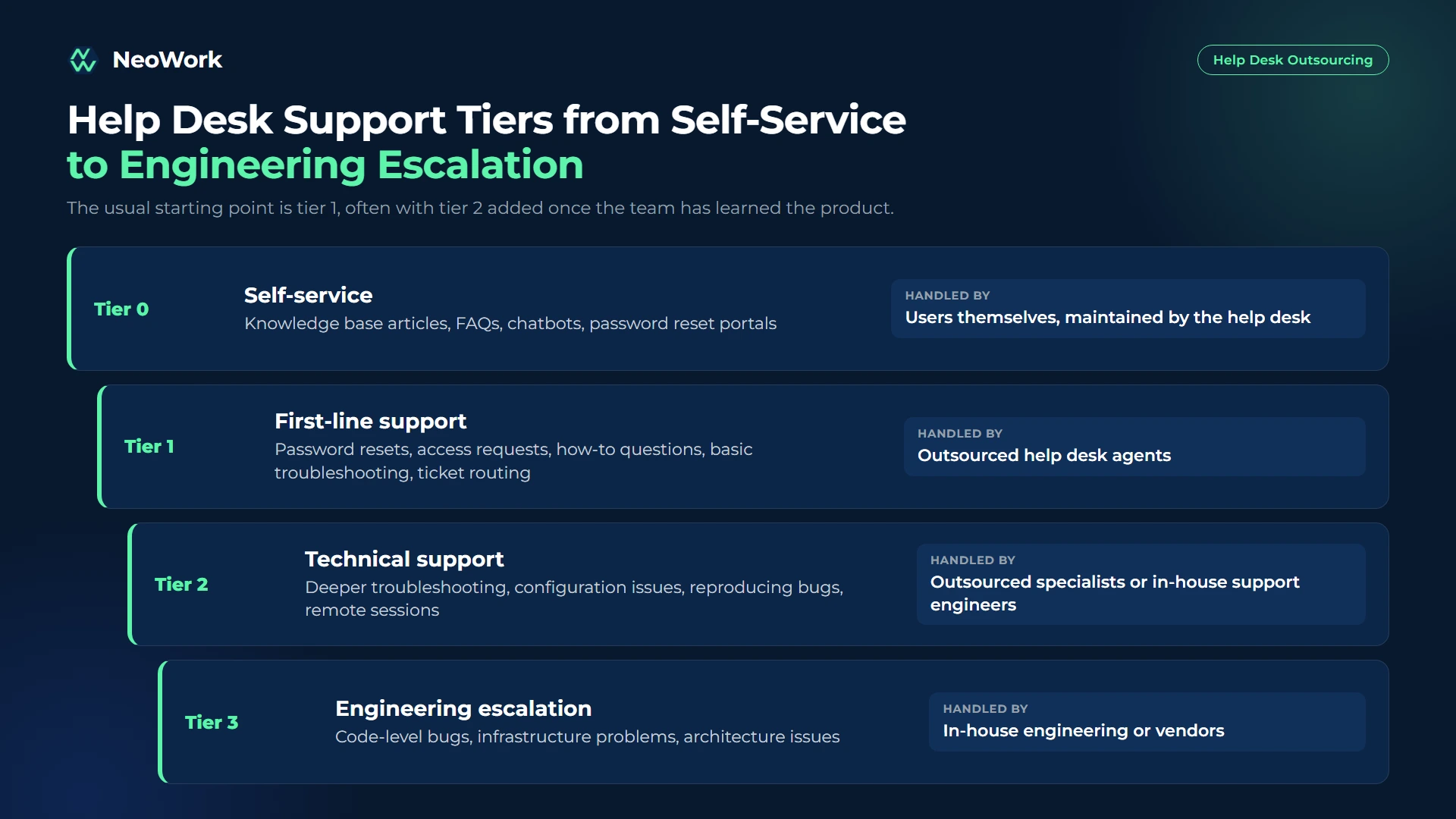
The usual starting point is tier 1, often with tier 2 added once the team has learned the product. Tier 3 almost always stays with the people who build and run the systems.

Get a Help Desk Team That Knows Your Product
At NeoWork, we build dedicated help desk teams that resolve tickets inside your own tools, whether that is Zendesk, Jira Service Management, Freshdesk, or ServiceNow. Our tech support engineers learn your product, follow your runbooks, and escalate cleanly when a ticket needs your engineers.
We handle recruiting, onboarding, benefits, and ongoing teammate support, so you get a stable team that keeps getting better at your product instead of a rotating queue of strangers.
What we bring:
- Dedicated tier 1 and tier 2 support specialists for internal IT or customer-facing support
- A 3.2% candidate selectivity rate, with technical screening built into hiring
- Industry-leading 91% annualized teammate retention rate, so product knowledge stays on your desk
- Extended and after-hours coverage across time zones
Contact us to tell us about your ticket volume and the tiers you want covered. We will propose a team setup and timeline that fits.
Benefits of Outsourcing Your Help Desk
- Senior time goes back to senior work: Engineers and IT admins stop handling password resets and focus on projects, infrastructure, and complex issues.
- Lower cost per ticket: Tickets resolved at tier 1 cost far less than tickets escalated to tier 2 or 3. A strong first-level team pushes more resolutions down to the cheapest tier.
- Extended coverage: An outsourced team in another time zone makes evening, weekend, or 24/7 support possible without overnight in-house shifts.
- Scalability: Product launches, office openings, or software migrations bring ticket spikes that an outsourced team can absorb.
- Better documentation: A good provider builds and maintains the knowledge base and runbooks as part of the job, which also improves self-service.
Help Desk Outsourcing Models
Co-managed setups are common with growing companies. The in-house team keeps ownership of systems and escalations, while a dedicated outsourced team handles the volume.
How Much Does Help Desk Outsourcing Cost?
Pricing usually follows one of four structures:
- Per user per month: Common for internal IT help desks and MSPs. A fixed monthly fee for each employee supported, usually with defined scope.
- Per ticket or per incident: You pay for each ticket handled. Works for low or unpredictable volumes but becomes expensive as volume grows.
- Per agent (FTE): A fixed monthly cost for each dedicated specialist. Predictable and well suited to steady volumes and dedicated teams.
- Hybrid: A base fee for a set number of agents or tickets plus a per-ticket rate above that threshold.
MetricNet benchmarks published with HDI in 2011 put the average North American cost at about 22 US dollars per ticket at tier 1 and about 62 US dollars at tier 2 (desktop support). Exact figures have shifted since, but the gap between tiers is the important part: every ticket solved at the first level saves money. When you compare quotes, look at the expected cost per resolved ticket, not just the rate card. You can see how we price dedicated specialists on our pricing page.
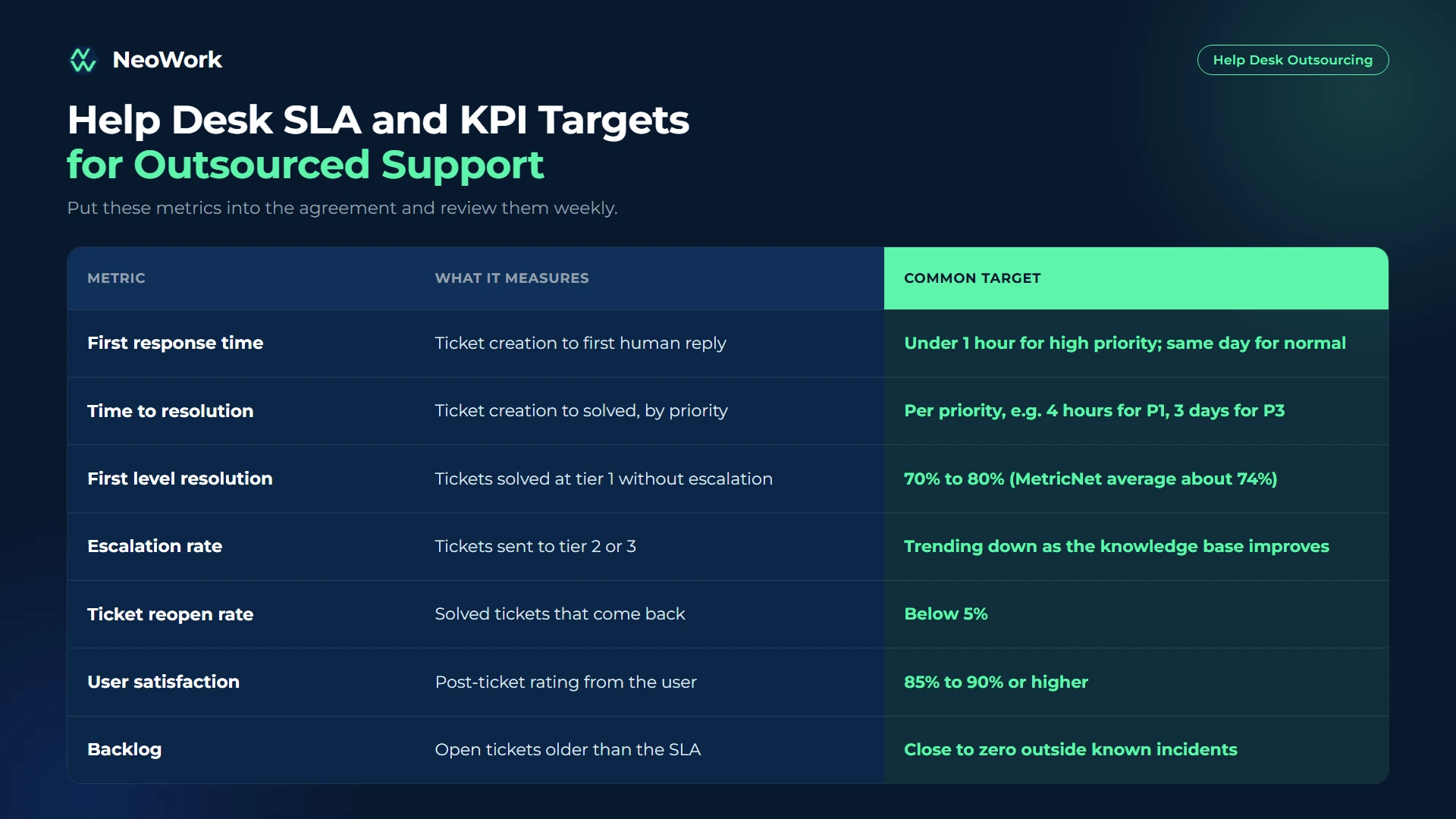
Help Desk SLAs and KPIs to Track

How to Outsource Your Help Desk Step by Step
- Analyze your tickets. Export three to six months of tickets and group them by category, priority, channel, and resolution tier. This shows what can realistically move to tier 1.
- Define scope and escalation rules. Decide which tiers, categories, hours, and channels the provider owns, and write clear handoff rules for escalations.
- Prepare documentation. Update runbooks, troubleshooting trees, macros, and the knowledge base. Gaps here become slow tickets later.
- Set up secure access. Create individual accounts with least-privilege permissions in the ticketing system, admin consoles, and remote support tools. Turn on multi-factor authentication and log admin actions.
- Train and shadow. Have new agents shadow your team, then handle tickets with review before working independently.
- Pilot one queue. Start with a single category or channel, such as password and access requests, and expand once SLAs hold.
- Review and improve. Hold weekly reviews of SLA performance, escalations, and knowledge gaps, and turn repeat tickets into self-service articles.
Questions Worth Asking Any Provider
- Which ticketing platforms and remote support tools does your team already know?
- How do you screen agents for technical skills?
- What is your process for knowledge base updates and repeat-ticket analysis?
- How do you protect admin credentials and customer data?
- What is your agent attrition rate, and how is knowledge handed over when someone leaves?
- How quickly can you scale for a launch, migration, or incident?
Common Help Desk Outsourcing Mistakes
- No escalation rules. If agents do not know exactly when and how to escalate, tickets either bounce around or sit in the wrong queue.
- Handing over shared admin accounts. Shared credentials make it impossible to audit who changed what. Use individual accounts and role-based access.
- Measuring ticket counts instead of outcomes. Closing many tickets means little if reopen rates and satisfaction drop.
- Letting the knowledge base go stale. Product changes without documentation updates push resolution back to tier 2.
- Outsourcing every tier at once. Start with tier 1, prove quality, then add complexity.
Final Thoughts
Help desk outsourcing pays off when it moves routine tickets off your most expensive people and resolves more issues at the first level. Start with a clear ticket analysis, outsource the tiers that are repeatable, keep strong escalation rules, and track resolution and satisfaction alongside speed.
Over time, a good outsourced desk also improves documentation, spots recurring problems, and makes support more predictable. If you want a team that works that way, explore our IT and technical support teams at NeoWork.
FAQ
Topics
Help Desk Outsourcing Guide: How It Works in 2026
Quick Summary: Help desk outsourcing means contracting an external provider to receive, log, troubleshoot, and resolve support tickets, either for your employees (an internal IT help desk) or for your customers (a technical support desk). The provider supplies trained support staff, ticket management processes, and reporting against agreed service levels. According to MetricNet benchmarks, the average net first level resolution rate for service desks is around 74%, which shows how much a well-run tier 1 team can solve before tickets climb to more expensive tiers. Most companies start by outsourcing tier 1, keep tier 3 with in-house engineers, and measure the provider on response time, first level resolution, and user satisfaction.
As a company grows, support tickets often outgrow the people answering them. Password resets and access requests pile up for internal IT, or customers wait days for help with setup and bugs. Engineers and product specialists end up spending their week on repetitive tickets instead of the projects they were hired for.
Outsourcing the help desk is one of the most common ways to fix that. Done well, it gives you longer coverage hours, faster first responses, and a cleaner escalation path, while your senior team handles only the tickets that need them.
What Is Help Desk Outsourcing?
Help desk outsourcing is the practice of delegating the intake, triage, and resolution of support requests to a third-party team. The outsourced help desk works through a ticketing system, follows documented troubleshooting steps and escalation rules, and is measured on response time, resolution rate, and user satisfaction.
There are two main types:
- Internal IT help desk: Supports your employees with password resets, account access, device setup, software installs, VPN issues, and onboarding or offboarding requests.
- Customer-facing technical support: Supports your customers with product setup, troubleshooting, bug reporting, how-to questions, and account issues, usually for software, SaaS, hardware, or connected devices.
Help desk and service desk are often used interchangeably. Strictly speaking, a service desk in ITIL terms is broader: it covers incident management plus service requests, change requests, and IT service management processes. A help desk focuses on solving user problems quickly.
Help Desk Support Tiers Explained
Most help desks organize work into tiers. Knowing which tiers to outsource is the most important scoping decision.

The usual starting point is tier 1, often with tier 2 added once the team has learned the product. Tier 3 almost always stays with the people who build and run the systems.

Get a Help Desk Team That Knows Your Product
At NeoWork, we build dedicated help desk teams that resolve tickets inside your own tools, whether that is Zendesk, Jira Service Management, Freshdesk, or ServiceNow. Our tech support engineers learn your product, follow your runbooks, and escalate cleanly when a ticket needs your engineers.
We handle recruiting, onboarding, benefits, and ongoing teammate support, so you get a stable team that keeps getting better at your product instead of a rotating queue of strangers.
What we bring:
- Dedicated tier 1 and tier 2 support specialists for internal IT or customer-facing support
- A 3.2% candidate selectivity rate, with technical screening built into hiring
- Industry-leading 91% annualized teammate retention rate, so product knowledge stays on your desk
- Extended and after-hours coverage across time zones
Contact us to tell us about your ticket volume and the tiers you want covered. We will propose a team setup and timeline that fits.
Benefits of Outsourcing Your Help Desk
- Senior time goes back to senior work: Engineers and IT admins stop handling password resets and focus on projects, infrastructure, and complex issues.
- Lower cost per ticket: Tickets resolved at tier 1 cost far less than tickets escalated to tier 2 or 3. A strong first-level team pushes more resolutions down to the cheapest tier.
- Extended coverage: An outsourced team in another time zone makes evening, weekend, or 24/7 support possible without overnight in-house shifts.
- Scalability: Product launches, office openings, or software migrations bring ticket spikes that an outsourced team can absorb.
- Better documentation: A good provider builds and maintains the knowledge base and runbooks as part of the job, which also improves self-service.
Help Desk Outsourcing Models
Co-managed setups are common with growing companies. The in-house team keeps ownership of systems and escalations, while a dedicated outsourced team handles the volume.
How Much Does Help Desk Outsourcing Cost?
Pricing usually follows one of four structures:
- Per user per month: Common for internal IT help desks and MSPs. A fixed monthly fee for each employee supported, usually with defined scope.
- Per ticket or per incident: You pay for each ticket handled. Works for low or unpredictable volumes but becomes expensive as volume grows.
- Per agent (FTE): A fixed monthly cost for each dedicated specialist. Predictable and well suited to steady volumes and dedicated teams.
- Hybrid: A base fee for a set number of agents or tickets plus a per-ticket rate above that threshold.
MetricNet benchmarks published with HDI in 2011 put the average North American cost at about 22 US dollars per ticket at tier 1 and about 62 US dollars at tier 2 (desktop support). Exact figures have shifted since, but the gap between tiers is the important part: every ticket solved at the first level saves money. When you compare quotes, look at the expected cost per resolved ticket, not just the rate card. You can see how we price dedicated specialists on our pricing page.
Help Desk SLAs and KPIs to Track

How to Outsource Your Help Desk Step by Step
- Analyze your tickets. Export three to six months of tickets and group them by category, priority, channel, and resolution tier. This shows what can realistically move to tier 1.
- Define scope and escalation rules. Decide which tiers, categories, hours, and channels the provider owns, and write clear handoff rules for escalations.
- Prepare documentation. Update runbooks, troubleshooting trees, macros, and the knowledge base. Gaps here become slow tickets later.
- Set up secure access. Create individual accounts with least-privilege permissions in the ticketing system, admin consoles, and remote support tools. Turn on multi-factor authentication and log admin actions.
- Train and shadow. Have new agents shadow your team, then handle tickets with review before working independently.
- Pilot one queue. Start with a single category or channel, such as password and access requests, and expand once SLAs hold.
- Review and improve. Hold weekly reviews of SLA performance, escalations, and knowledge gaps, and turn repeat tickets into self-service articles.
Questions Worth Asking Any Provider
- Which ticketing platforms and remote support tools does your team already know?
- How do you screen agents for technical skills?
- What is your process for knowledge base updates and repeat-ticket analysis?
- How do you protect admin credentials and customer data?
- What is your agent attrition rate, and how is knowledge handed over when someone leaves?
- How quickly can you scale for a launch, migration, or incident?
Common Help Desk Outsourcing Mistakes
- No escalation rules. If agents do not know exactly when and how to escalate, tickets either bounce around or sit in the wrong queue.
- Handing over shared admin accounts. Shared credentials make it impossible to audit who changed what. Use individual accounts and role-based access.
- Measuring ticket counts instead of outcomes. Closing many tickets means little if reopen rates and satisfaction drop.
- Letting the knowledge base go stale. Product changes without documentation updates push resolution back to tier 2.
- Outsourcing every tier at once. Start with tier 1, prove quality, then add complexity.
Final Thoughts
Help desk outsourcing pays off when it moves routine tickets off your most expensive people and resolves more issues at the first level. Start with a clear ticket analysis, outsource the tiers that are repeatable, keep strong escalation rules, and track resolution and satisfaction alongside speed.
Over time, a good outsourced desk also improves documentation, spots recurring problems, and makes support more predictable. If you want a team that works that way, explore our IT and technical support teams at NeoWork.
FAQ
Topics
Related Blogs
Related Podcasts


.webp)
.webp)
.webp)