

.avif)
.avif)

IT Support Outsourcing Guide: Costs, Models & Best Practices


.svg)

Quick Summary: IT support outsourcing means hiring an external provider to handle help desk tickets, network monitoring, security, or full IT management instead of building an in-house team. It typically cuts staffing costs, adds specialized expertise, and enables 24/7 coverage, though it requires careful vendor vetting around SLAs, security, and communication. Costs vary by model (onshore, nearshore, offshore) and scope, so businesses should request current quotes directly from shortlisted providers.
Somewhere between a growing ticket queue and a shrinking IT budget, most companies start asking the same question: should this be handled in-house, or handed to someone else? IT support outsourcing has quietly become the default answer for thousands of businesses, from five-person startups to enterprises with global footprints. Yet the decision rarely feels simple once you start comparing pricing models, coverage hours, and vendor promises.
This guide breaks down what IT support outsourcing actually involves, what it costs in 2026, and how to pick a partner that won't turn into another headache. No fluff, no vendor pitch — just the practical stuff needed before signing a contract.\
What Is IT Support Outsourcing, Exactly?
IT support outsourcing means contracting an external provider to manage some or all of a company's technical support functions — help desk tickets, network monitoring, endpoint management, cybersecurity response, or full infrastructure oversight. Instead of hiring, training, and retaining an internal team, businesses pay a third party to deliver that expertise on a subscription or hourly basis.
It's not an all-or-nothing arrangement. Some organizations outsource only after-hours support to cover nights and weekends. Others hand over the entire IT function and keep just a single internal liaison. The right shape depends on budget, risk tolerance, and how technical the core business actually is.
Common Outsourcing Models
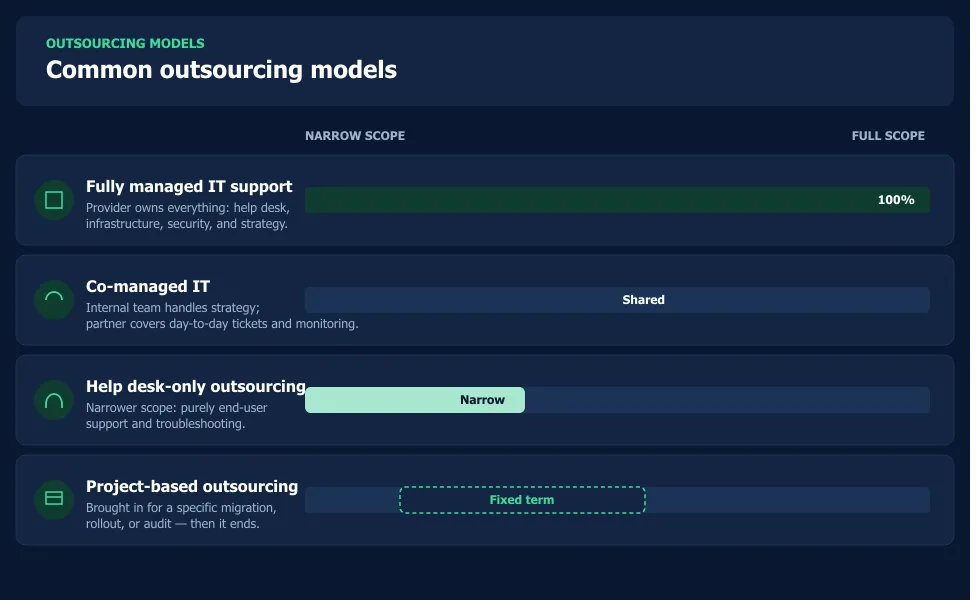
- Fully managed IT support — the provider owns everything: help desk, infrastructure, security, and strategy.
- Co-managed IT — an internal team handles strategic work while the outsourced partner covers day-to-day tickets and monitoring.
- Help desk-only outsourcing — a narrower scope focused purely on end-user support and troubleshooting.
- Project-based outsourcing — brought in for a specific migration, rollout, or security audit, then the engagement ends.
Onshore, Nearshore, or Offshore: Where Should Support Sit?
Location shapes cost, time zone coverage, and communication style more than most buyers expect. Onshore providers sit in the same country and usually cost the most but offer the smoothest communication. Nearshore providers operate in nearby time zones — often at a meaningful discount — while offshore teams, frequently based in South Asia or Eastern Europe, tend to deliver the lowest hourly rates but require more deliberate management around language and overlap hours.

Build IT Support Capacity with NeoWork
IT support outsourcing helps companies manage recurring technical requests, user issues, system support, and service workflows without expanding every role internally. NeoWork provides remote teammates who can support IT and development functions alongside customer and operational teams. NeoWork handles recruitment, benefits, training, and ongoing engagement, while teammates integrate into the client’s tools, systems, and support processes. Its 91% annualized teammate retention rate and 3.2% candidate selectivity rate reflect a focus on selective hiring and longer-term team stability.
NeoWork's IT support outsourcing model offers:
- IT and technical support teammates
- integration with the client’s tools and processes
- recruitment and ongoing teammate support
Contact NeoWork to add IT support capacity that works within your existing operations.
Why Companies Outsource IT Support
Cost reduction gets top billing in almost every pitch deck, and it's real — avoiding salaries, benefits, training, and tooling for an in-house team adds up fast. But the benefits go further than the spreadsheet.
- Access to broader expertise. A single in-house hire can't specialize in networking, cloud security, and endpoint management simultaneously. An outsourced team usually can.
- 24/7 coverage without night-shift staffing. Round-the-clock support becomes realistic once it's not tied to one employee's sleep schedule.
- Faster scaling. Adding ten new employees doesn't require hiring another technician — the provider absorbs the load.
- Predictable spend. Fixed monthly contracts replace unpredictable overtime and emergency contractor fees.
- Reduced turnover risk. Losing one internal IT hire can gut institutional knowledge overnight; outsourced teams spread that risk across a larger bench.
The Trade-Offs Worth Knowing
Outsourcing isn't free of friction. Communication gaps, less institutional knowledge of company-specific quirks, and dependency on a third party's own staffing stability are all real risks. Some businesses also struggle with a sense of losing control over sensitive systems — which is exactly why contract terms and security vetting matter so much before signing anything.
How Much Does IT Support Outsourcing Cost?
Pricing varies enormously depending on scope, location, and service level. Most providers use one of a few structures: per-user monthly pricing, per-device pricing, tiered flat-rate packages, or hourly/block-hour billing for smaller needs. Small businesses often land somewhere in the range of modest per-user monthly fees, while enterprise-grade managed services with dedicated account teams and advanced security monitoring cost considerably more. Exact numbers shift year to year and by region, so it's worth requesting current quotes directly from shortlisted providers rather than relying on published averages.
What tends to drive cost up isn't the base support tier — it's add-ons like after-hours coverage, compliance reporting, advanced cybersecurity monitoring, and on-site visits. Ask providers to break these out separately during quoting so comparisons stay apples-to-apples.
Choosing the Right Outsourcing Partner
Here's the thing though — most bad outsourcing experiences trace back to a rushed vendor selection, not the concept of outsourcing itself. A slower, more deliberate evaluation almost always pays off.
Questions Worth Asking Before Signing
- What are the guaranteed response and resolution times, and are they backed by penalties in the SLA?
- How is data security handled, and what certifications does the provider hold?
- What does the escalation path look like when a ticket needs specialist attention?
- Can the provider show references from businesses of a similar size and industry?
- What happens at contract end — is there a clean transition plan for data and knowledge transfer?
Pricing matters, obviously. But a provider that's slightly more expensive with clear SLAs and strong references usually beats the cheapest option that leaves everything vague.
Steps to Successfully Outsource IT Support
- Define the goal first. Cost savings, coverage expansion, and specialized expertise call for different provider profiles.
- Map current pain points. Ticket backlog, security gaps, and after-hours coverage all point to different scopes of work.
- Shortlist three to five providers and request detailed proposals, not just pricing sheets.
- Run a pilot or trial period on a limited scope before committing to a full contract.
- Set clear KPIs — first response time, resolution time, and customer satisfaction scores are the usual baseline.
- Review quarterly. Outsourcing relationships that go unreviewed tend to drift from the original agreement.
Where IT Support Outsourcing Is Headed in 2026
AI-assisted triage is now standard in most reputable help desks — chatbots and automated ticket routing handle a growing share of level-one issues before a human ever gets involved. That's shifting outsourced teams toward handling more complex, judgment-heavy tickets rather than password resets. Cybersecurity has also become inseparable from general support outsourcing, with many providers folding basic threat monitoring into standard packages rather than selling it separately.
Hybrid staffing — a blend of onshore strategic oversight and offshore execution — continues gaining ground as businesses try to balance cost with responsiveness.
In-House vs. Outsourced: A Quick Comparison
Final Thoughts
IT support outsourcing isn't a one-size-fits-all decision, and it doesn't have to be permanent either. Plenty of businesses start with a narrow slice — after-hours coverage, or a single project — before expanding once trust is established. The mistake to avoid is treating provider selection as a formality; the SLA terms and security vetting done upfront determine whether the relationship saves money or creates new problems down the line.
Start small, set clear KPIs, and review the relationship regularly. That approach tends to separate the businesses that outsource successfully from the ones that end up switching providers twice in a year.
FAQ: IT Support Outsourcing
Topics
IT Support Outsourcing Guide: Costs, Models & Best Practices

Quick Summary: IT support outsourcing means hiring an external provider to handle help desk tickets, network monitoring, security, or full IT management instead of building an in-house team. It typically cuts staffing costs, adds specialized expertise, and enables 24/7 coverage, though it requires careful vendor vetting around SLAs, security, and communication. Costs vary by model (onshore, nearshore, offshore) and scope, so businesses should request current quotes directly from shortlisted providers.
Somewhere between a growing ticket queue and a shrinking IT budget, most companies start asking the same question: should this be handled in-house, or handed to someone else? IT support outsourcing has quietly become the default answer for thousands of businesses, from five-person startups to enterprises with global footprints. Yet the decision rarely feels simple once you start comparing pricing models, coverage hours, and vendor promises.
This guide breaks down what IT support outsourcing actually involves, what it costs in 2026, and how to pick a partner that won't turn into another headache. No fluff, no vendor pitch — just the practical stuff needed before signing a contract.\
What Is IT Support Outsourcing, Exactly?
IT support outsourcing means contracting an external provider to manage some or all of a company's technical support functions — help desk tickets, network monitoring, endpoint management, cybersecurity response, or full infrastructure oversight. Instead of hiring, training, and retaining an internal team, businesses pay a third party to deliver that expertise on a subscription or hourly basis.
It's not an all-or-nothing arrangement. Some organizations outsource only after-hours support to cover nights and weekends. Others hand over the entire IT function and keep just a single internal liaison. The right shape depends on budget, risk tolerance, and how technical the core business actually is.
Common Outsourcing Models
- Fully managed IT support — the provider owns everything: help desk, infrastructure, security, and strategy.
- Co-managed IT — an internal team handles strategic work while the outsourced partner covers day-to-day tickets and monitoring.
- Help desk-only outsourcing — a narrower scope focused purely on end-user support and troubleshooting.
- Project-based outsourcing — brought in for a specific migration, rollout, or security audit, then the engagement ends.
Onshore, Nearshore, or Offshore: Where Should Support Sit?
Location shapes cost, time zone coverage, and communication style more than most buyers expect. Onshore providers sit in the same country and usually cost the most but offer the smoothest communication. Nearshore providers operate in nearby time zones — often at a meaningful discount — while offshore teams, frequently based in South Asia or Eastern Europe, tend to deliver the lowest hourly rates but require more deliberate management around language and overlap hours.
Build IT Support Capacity with NeoWork
IT support outsourcing helps companies manage recurring technical requests, user issues, system support, and service workflows without expanding every role internally. NeoWork provides remote teammates who can support IT and development functions alongside customer and operational teams. NeoWork handles recruitment, benefits, training, and ongoing engagement, while teammates integrate into the client’s tools, systems, and support processes. Its 91% annualized teammate retention rate and 3.2% candidate selectivity rate reflect a focus on selective hiring and longer-term team stability.
NeoWork's IT support outsourcing model offers:
- IT and technical support teammates
- integration with the client’s tools and processes
- recruitment and ongoing teammate support
Contact NeoWork to add IT support capacity that works within your existing operations.
Why Companies Outsource IT Support
Cost reduction gets top billing in almost every pitch deck, and it's real — avoiding salaries, benefits, training, and tooling for an in-house team adds up fast. But the benefits go further than the spreadsheet.
- Access to broader expertise. A single in-house hire can't specialize in networking, cloud security, and endpoint management simultaneously. An outsourced team usually can.
- 24/7 coverage without night-shift staffing. Round-the-clock support becomes realistic once it's not tied to one employee's sleep schedule.
- Faster scaling. Adding ten new employees doesn't require hiring another technician — the provider absorbs the load.
- Predictable spend. Fixed monthly contracts replace unpredictable overtime and emergency contractor fees.
- Reduced turnover risk. Losing one internal IT hire can gut institutional knowledge overnight; outsourced teams spread that risk across a larger bench.
The Trade-Offs Worth Knowing
Outsourcing isn't free of friction. Communication gaps, less institutional knowledge of company-specific quirks, and dependency on a third party's own staffing stability are all real risks. Some businesses also struggle with a sense of losing control over sensitive systems — which is exactly why contract terms and security vetting matter so much before signing anything.
How Much Does IT Support Outsourcing Cost?
Pricing varies enormously depending on scope, location, and service level. Most providers use one of a few structures: per-user monthly pricing, per-device pricing, tiered flat-rate packages, or hourly/block-hour billing for smaller needs. Small businesses often land somewhere in the range of modest per-user monthly fees, while enterprise-grade managed services with dedicated account teams and advanced security monitoring cost considerably more. Exact numbers shift year to year and by region, so it's worth requesting current quotes directly from shortlisted providers rather than relying on published averages.
What tends to drive cost up isn't the base support tier — it's add-ons like after-hours coverage, compliance reporting, advanced cybersecurity monitoring, and on-site visits. Ask providers to break these out separately during quoting so comparisons stay apples-to-apples.
Choosing the Right Outsourcing Partner
Here's the thing though — most bad outsourcing experiences trace back to a rushed vendor selection, not the concept of outsourcing itself. A slower, more deliberate evaluation almost always pays off.
Questions Worth Asking Before Signing
- What are the guaranteed response and resolution times, and are they backed by penalties in the SLA?
- How is data security handled, and what certifications does the provider hold?
- What does the escalation path look like when a ticket needs specialist attention?
- Can the provider show references from businesses of a similar size and industry?
- What happens at contract end — is there a clean transition plan for data and knowledge transfer?
Pricing matters, obviously. But a provider that's slightly more expensive with clear SLAs and strong references usually beats the cheapest option that leaves everything vague.
Steps to Successfully Outsource IT Support
- Define the goal first. Cost savings, coverage expansion, and specialized expertise call for different provider profiles.
- Map current pain points. Ticket backlog, security gaps, and after-hours coverage all point to different scopes of work.
- Shortlist three to five providers and request detailed proposals, not just pricing sheets.
- Run a pilot or trial period on a limited scope before committing to a full contract.
- Set clear KPIs — first response time, resolution time, and customer satisfaction scores are the usual baseline.
- Review quarterly. Outsourcing relationships that go unreviewed tend to drift from the original agreement.
Where IT Support Outsourcing Is Headed in 2026
AI-assisted triage is now standard in most reputable help desks — chatbots and automated ticket routing handle a growing share of level-one issues before a human ever gets involved. That's shifting outsourced teams toward handling more complex, judgment-heavy tickets rather than password resets. Cybersecurity has also become inseparable from general support outsourcing, with many providers folding basic threat monitoring into standard packages rather than selling it separately.
Hybrid staffing — a blend of onshore strategic oversight and offshore execution — continues gaining ground as businesses try to balance cost with responsiveness.
In-House vs. Outsourced: A Quick Comparison
Final Thoughts
IT support outsourcing isn't a one-size-fits-all decision, and it doesn't have to be permanent either. Plenty of businesses start with a narrow slice — after-hours coverage, or a single project — before expanding once trust is established. The mistake to avoid is treating provider selection as a formality; the SLA terms and security vetting done upfront determine whether the relationship saves money or creates new problems down the line.
Start small, set clear KPIs, and review the relationship regularly. That approach tends to separate the businesses that outsource successfully from the ones that end up switching providers twice in a year.
FAQ: IT Support Outsourcing
Topics
Related Blogs
Related Podcasts


.webp)

.webp)
.webp)



