
Green glowing circular pattern with concentric rings and faint hexagonal grid on the left side.
Blue abstract hexagonal pattern with glowing circular gradient edges on a black background.Glowing greenish-blue hexagonal pattern with concentric circular gradients on a black background.

Salesforce Staff Augmentation Guide: How It Works in 2026

Calendar Icon
Published:
Oct 29
2026
,
Updated:
Oct 30
2026
Ann
Facebook IconInstagram Icon

Build your team with NeoWork

Talk to us about how we staff and manage high-performing remote teams for companies like yours.

Get a Salesforce Staff Augmentation Quote

Quick Summary: Salesforce staff augmentation is when a company adds individual Salesforce professionals (admins, developers, consultants, or architects) from an external partner to its own team, under its own management, to fill specific skill or capacity gaps. It is faster than hiring and more flexible than handing a project to a consultancy. Demand for Salesforce skills keeps outrunning supply: an IDC study commissioned by Salesforce projected that the Salesforce ecosystem would create about 9.3 million new jobs worldwide by 2026. This guide covers which Salesforce roles you can augment, when staff augmentation beats other models, how to vet candidates, what it costs, and how to onboard augmented specialists into your org safely.

Most Salesforce teams are permanently behind. Admins juggle user requests, data cleanup, and new automation. Developers are pulled between integrations, bug fixes, and a growing backlog of Apex and Lightning Web Component work. Then a new initiative lands, such as a CPQ rollout, a Data Cloud project, or an Agentforce pilot, and nobody on the team has done it before.

Staff augmentation solves that by adding exactly the skills you are missing, for as long as you need them, without a long hiring process or a full consulting engagement. This guide explains how to do it well.

What Is Salesforce Staff Augmentation?

Salesforce staff augmentation is a hiring model in which an external provider supplies individual Salesforce specialists who join your existing team. They work in your org, follow your processes, attend your standups, and report to your Salesforce lead or product owner. The provider handles recruiting, employment, payroll, and benefits.

The key difference from other models is control. With staff augmentation, you direct the work day to day. With a Salesforce consulting partner, the partner owns delivery and outcomes. With team augmentation, you add a complete pod that brings its own structure. If you are comparing those options, our guide to how we work shows how dedicated specialists fit into existing teams.
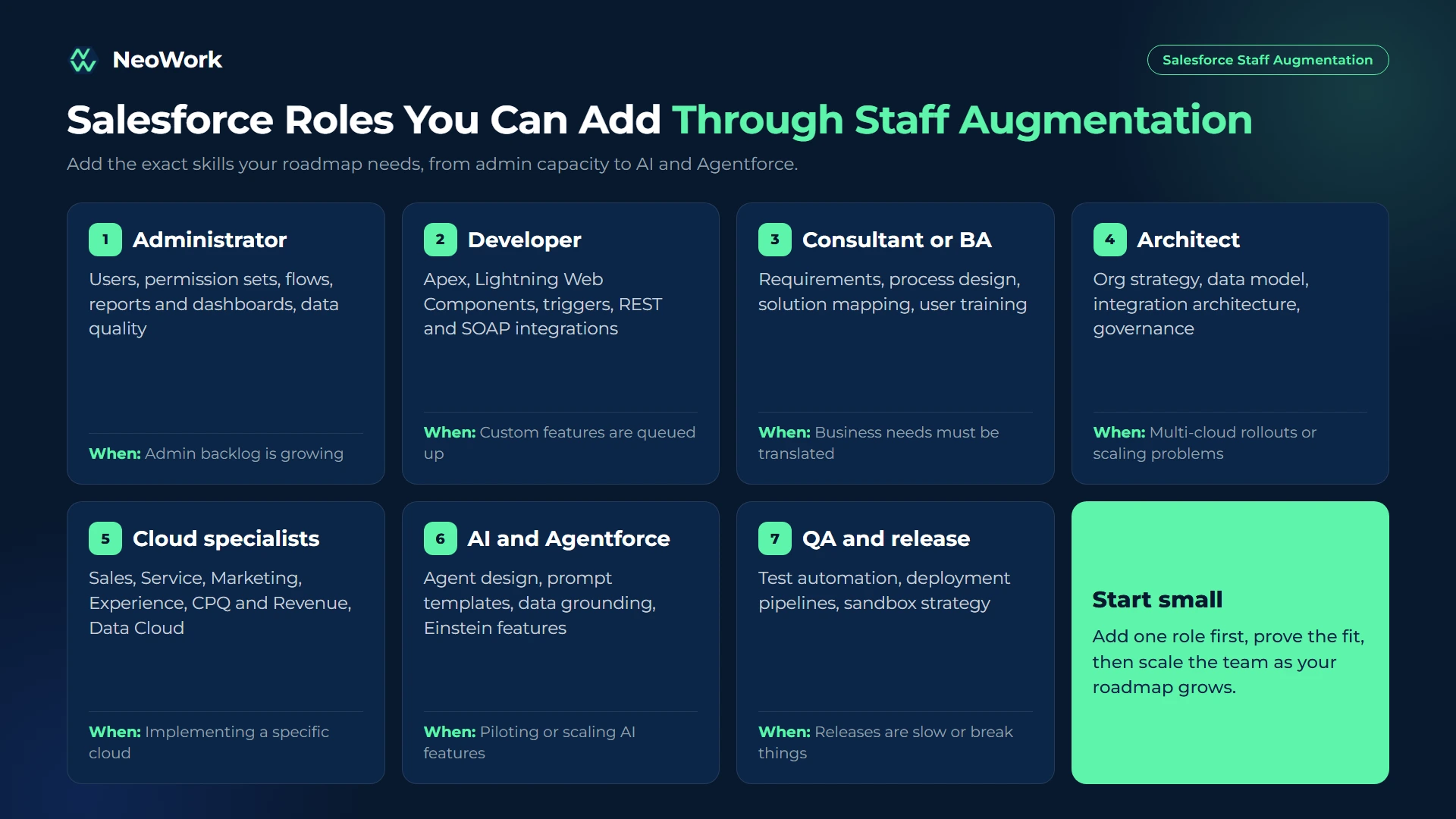
Salesforce Roles You Can Augment

Role What They Do When You Need One
Salesforce administrator User management, profiles and permission sets, flows, reports and dashboards, data quality Admin backlog is growing or your admin is overloaded
Salesforce developer Apex, Lightning Web Components, triggers, integrations via REST and SOAP APIs, test coverage Custom functionality or integrations are queued up
Salesforce consultant or business analyst Requirements gathering, process design, solution mapping, user training Business teams need someone to translate needs into Salesforce
Salesforce architect Org strategy, data model, integration architecture, governance, technical debt Multi-cloud rollouts, mergers of orgs, or scaling problems
Cloud specialists Sales Cloud, Service Cloud, Marketing Cloud, Experience Cloud, CPQ and Revenue Cloud, Data Cloud Implementing or optimizing a specific cloud
AI and Agentforce specialists Agent design, prompt templates, data grounding, Einstein features Piloting or scaling AI features in Salesforce
QA and release specialists Test automation, deployment pipelines, sandbox strategy Releases are slow or break things
Salesforce staff augmentation roles including administrator, developer, consultant, architect, cloud specialists, Agentforce specialists, and QA and release specialists

Add Vetted Salesforce Talent to Your Team

At NeoWork, we help companies add dedicated Salesforce admins, developers, and specialists who work inside your org as part of your team. We recruit for the exact skills you need, onboard them into your processes, and handle employment, benefits, and ongoing teammate support.

Our model includes:

  • Dedicated Salesforce specialists who report to your team and work in your tools
  • A 3.2% candidate selectivity rate, with technical screening for Salesforce skills
  • Industry-leading 91% annualized teammate retention rate, so your org knowledge stays on the team
  • Flexible capacity that grows or shrinks with your roadmap

Contact us to tell us which Salesforce roles you need. We will outline candidate profiles and a realistic start date.

When Salesforce Staff Augmentation Makes Sense

Staff augmentation is the right fit when you have a clear internal owner and a clearly defined gap. The classic case is a company with a capable Salesforce lead who simply does not have enough hands: requests pile up, the admin is firefighting, and new projects wait. Adding one or two specialists under that lead unlocks capacity immediately, because the direction and standards already exist.

It also works well when you need a specific skill for a defined period. A CPQ implementation, a Marketing Cloud migration, or an Agentforce pilot may require expertise your team does not have and will not need permanently. Hiring full-time for that skill would be slow and hard to justify; augmenting for six or twelve months is not. Because the specialist works alongside your people, knowledge transfer happens naturally rather than at a rushed handover meeting.

Staff augmentation is less suitable when nobody internally can manage the work, or when you need several roles working together with their own delivery rhythm. In those cases, team augmentation or a consulting partner usually fits better, and forcing the staff augmentation model tends to leave specialists waiting for direction.

Salesforce Staff Augmentation vs. Other Models

Model Who Manages the Work Best For Trade-Offs
Staff augmentation Your team Filling specific skill or capacity gaps Needs internal management
Team augmentation Shared: the pod has its own lead, you set priorities Larger initiatives that need several roles Higher monthly cost
Consulting partner (project-based) The partner Implementations with fixed scope and deadlines Knowledge often leaves with the partner
Freelancers Your team Short, well-defined tasks Availability and security risks
Full-time hire Your team Long-term, core roles Slow and expensive to hire

How to Vet Salesforce Candidates

  • Certifications as a baseline: Look for role-relevant certifications such as Administrator, Platform Developer I and II, or cloud-specific consultant credentials. Verify them on Salesforce's credential verification site.
  • Hands-on exercises: Ask developers to build a small LWC or Apex trigger with tests, and admins to design a flow for a real business scenario.
  • Governor limits and best practices: Good developers explain bulkification, governor limits, and when to use flows versus code.
  • Org experience: Ask about the size and complexity of orgs they have worked in, and how they handled data migrations or integrations.
  • Communication: Augmented specialists talk to your stakeholders directly, so clear communication matters as much as technical skill.

How Much Does Salesforce Staff Augmentation Cost?

Cost depends on role, seniority, cloud specialization, and location. Architects and specialists in niche clouds such as CPQ, Marketing Cloud, or Data Cloud cost more than admins. Common pricing models:

  • Monthly rate per specialist: A fixed monthly fee for each dedicated full-time specialist. The most common and most predictable model.
  • Hourly rate: Billing for hours worked, often used for part-time or short engagements.
  • Retainer for a block of hours: A set number of hours per month for ongoing admin or development support.

Rates vary widely by region. Nearshore and offshore specialists often cost significantly less than onshore contractors with similar certifications. See how we structure dedicated roles on our pricing page, and compare providers in our overview of offshore staff augmentation companies.
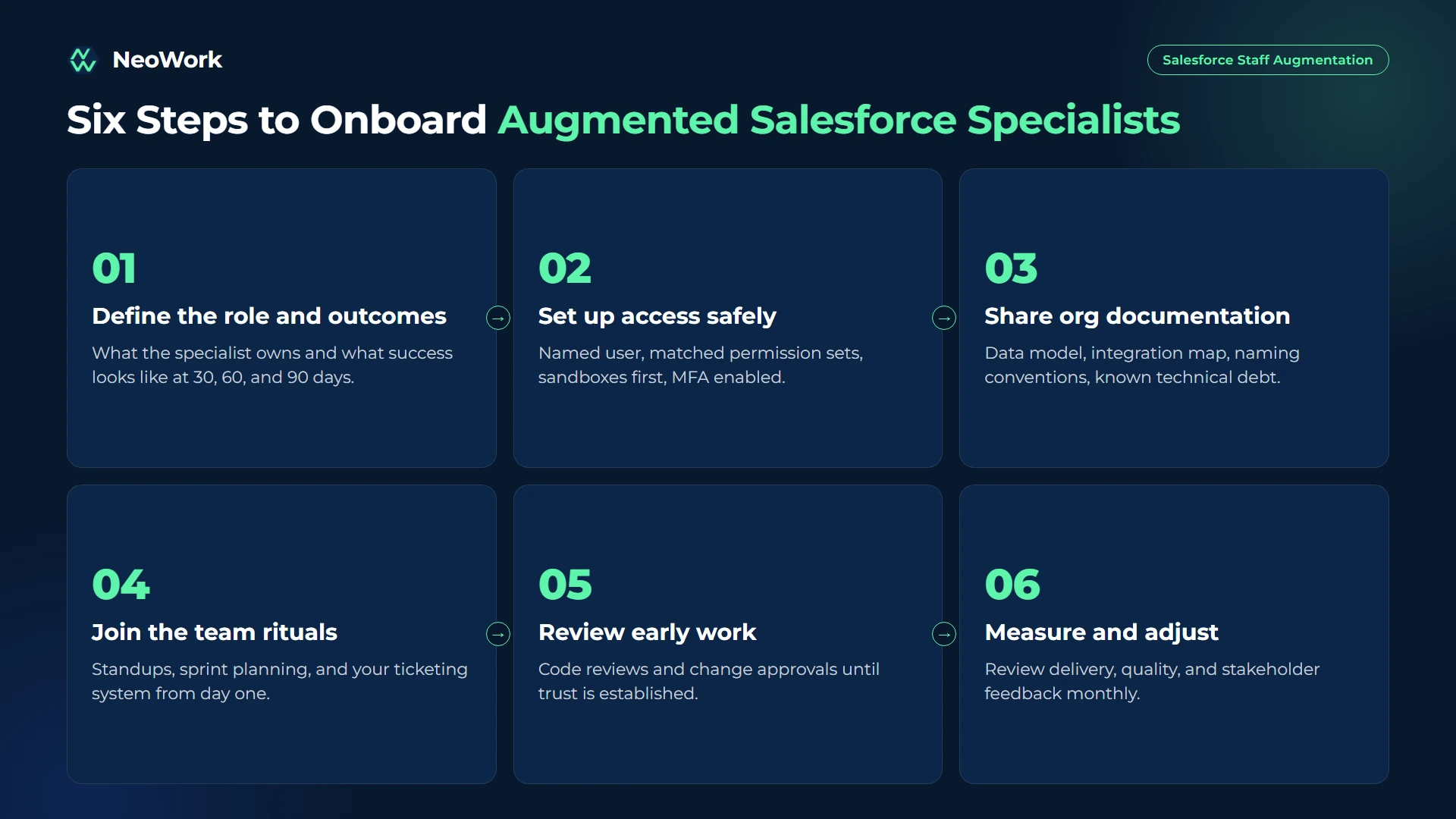
How to Onboard Augmented Salesforce Specialists

Salesforce staff augmentation onboarding steps from defining the role and access setup to sandbox work, code review, first release, and performance review
  1. Define the role and outcomes. Write what the specialist will own, which clouds and features, and what success looks like at 30, 60, and 90 days.
  2. Set up access safely. Create a named user with a profile and permission sets matched to the role. Start developers in sandboxes, not production, and enable multi-factor authentication.
  3. Share org documentation. Provide the data model, integration map, naming conventions, and known technical debt.
  4. Join the team rituals. Add the specialist to standups, sprint planning, and your ticketing system from day one.
  5. Review early work. Use code reviews and change approvals for the first releases until trust is established.
  6. Measure and adjust. Review delivery, quality, and stakeholder feedback monthly.

Questions Worth Asking Any Provider

  • How do you test Salesforce skills beyond certifications?
  • Can we interview candidates before they start?
  • Will the specialist work only on our account?
  • How quickly can you replace someone if the fit is wrong?
  • What time zone overlap can you guarantee?
  • Who owns the work product and intellectual property?

Common Salesforce Staff Augmentation Mistakes

The most dangerous mistake is giving new specialists production admin rights on their first day. Even experienced people make mistakes in an unfamiliar org, and broad permissions turn small mistakes into incidents. Starting in sandboxes with limited permissions costs a few days and prevents most problems.

The most common mistake is the absence of an internal owner. Augmented specialists without clear direction either wait for work or build what they think is needed, which is rarely what the business expected. Closely related is hiring purely on certifications, which shows knowledge but not the judgment needed in a complex org.

Two quieter problems show up later. Undocumented changes create technical debt that becomes visible when the engagement ends, and too little time zone overlap slows feedback and decisions until the specialist's productivity drops. Both are easy to prevent if they are discussed before the engagement starts.

Final Thoughts

Salesforce staff augmentation is the fastest way to add specific Salesforce skills while keeping control of your org and roadmap. It works best when you have a clear internal owner, a defined role, and safe access practices. For larger initiatives that need several roles working together, consider adding a full pod through team augmentation instead.

If you are ready to add Salesforce talent without a long hiring cycle, explore our development teams at NeoWork.

FAQ

What is Salesforce staff augmentation?

It is a model where an external provider supplies individual Salesforce professionals who join your team and work under your management, while the provider handles hiring, employment, and benefits.

How is staff augmentation different from a Salesforce consulting partner?

With staff augmentation, you manage the work and keep control of priorities. A consulting partner owns delivery for a defined project and usually works with its own team and methods.

Which Salesforce roles are most often augmented?

Administrators, developers, business analysts, architects, and specialists in clouds such as CPQ, Marketing Cloud, Service Cloud, and Data Cloud.

How fast can an augmented Salesforce specialist start?

Depending on the role and seniority, providers can often present candidates within days and have a specialist working within a few weeks.

Is it safe to give augmented staff access to our Salesforce org?

Yes, with named users, least-privilege permission sets, multi-factor authentication, sandbox-first development, and change approvals for production deployments.

How much does Salesforce staff augmentation cost?

Most providers charge a monthly rate per dedicated specialist or an hourly rate. Cost depends on role, seniority, cloud specialization, and location.

When should I choose team augmentation instead?

Choose team augmentation when you need several roles working together, such as an architect, developers, an admin, and QA, and you want the group to bring its own delivery structure.

Topics
No items found.

Salesforce Staff Augmentation Guide: How It Works in 2026

Paper
Calendar Icon
Oct 29, 2026
Ann

Quick Summary: Salesforce staff augmentation is when a company adds individual Salesforce professionals (admins, developers, consultants, or architects) from an external partner to its own team, under its own management, to fill specific skill or capacity gaps. It is faster than hiring and more flexible than handing a project to a consultancy. Demand for Salesforce skills keeps outrunning supply: an IDC study commissioned by Salesforce projected that the Salesforce ecosystem would create about 9.3 million new jobs worldwide by 2026. This guide covers which Salesforce roles you can augment, when staff augmentation beats other models, how to vet candidates, what it costs, and how to onboard augmented specialists into your org safely.

Most Salesforce teams are permanently behind. Admins juggle user requests, data cleanup, and new automation. Developers are pulled between integrations, bug fixes, and a growing backlog of Apex and Lightning Web Component work. Then a new initiative lands, such as a CPQ rollout, a Data Cloud project, or an Agentforce pilot, and nobody on the team has done it before.

Staff augmentation solves that by adding exactly the skills you are missing, for as long as you need them, without a long hiring process or a full consulting engagement. This guide explains how to do it well.

What Is Salesforce Staff Augmentation?

Salesforce staff augmentation is a hiring model in which an external provider supplies individual Salesforce specialists who join your existing team. They work in your org, follow your processes, attend your standups, and report to your Salesforce lead or product owner. The provider handles recruiting, employment, payroll, and benefits.

The key difference from other models is control. With staff augmentation, you direct the work day to day. With a Salesforce consulting partner, the partner owns delivery and outcomes. With team augmentation, you add a complete pod that brings its own structure. If you are comparing those options, our guide to how we work shows how dedicated specialists fit into existing teams.

Salesforce Roles You Can Augment

Role What They Do When You Need One
Salesforce administrator User management, profiles and permission sets, flows, reports and dashboards, data quality Admin backlog is growing or your admin is overloaded
Salesforce developer Apex, Lightning Web Components, triggers, integrations via REST and SOAP APIs, test coverage Custom functionality or integrations are queued up
Salesforce consultant or business analyst Requirements gathering, process design, solution mapping, user training Business teams need someone to translate needs into Salesforce
Salesforce architect Org strategy, data model, integration architecture, governance, technical debt Multi-cloud rollouts, mergers of orgs, or scaling problems
Cloud specialists Sales Cloud, Service Cloud, Marketing Cloud, Experience Cloud, CPQ and Revenue Cloud, Data Cloud Implementing or optimizing a specific cloud
AI and Agentforce specialists Agent design, prompt templates, data grounding, Einstein features Piloting or scaling AI features in Salesforce
QA and release specialists Test automation, deployment pipelines, sandbox strategy Releases are slow or break things
Salesforce staff augmentation roles including administrator, developer, consultant, architect, cloud specialists, Agentforce specialists, and QA and release specialists

Add Vetted Salesforce Talent to Your Team

At NeoWork, we help companies add dedicated Salesforce admins, developers, and specialists who work inside your org as part of your team. We recruit for the exact skills you need, onboard them into your processes, and handle employment, benefits, and ongoing teammate support.

Our model includes:

  • Dedicated Salesforce specialists who report to your team and work in your tools
  • A 3.2% candidate selectivity rate, with technical screening for Salesforce skills
  • Industry-leading 91% annualized teammate retention rate, so your org knowledge stays on the team
  • Flexible capacity that grows or shrinks with your roadmap

Contact us to tell us which Salesforce roles you need. We will outline candidate profiles and a realistic start date.

When Salesforce Staff Augmentation Makes Sense

Staff augmentation is the right fit when you have a clear internal owner and a clearly defined gap. The classic case is a company with a capable Salesforce lead who simply does not have enough hands: requests pile up, the admin is firefighting, and new projects wait. Adding one or two specialists under that lead unlocks capacity immediately, because the direction and standards already exist.

It also works well when you need a specific skill for a defined period. A CPQ implementation, a Marketing Cloud migration, or an Agentforce pilot may require expertise your team does not have and will not need permanently. Hiring full-time for that skill would be slow and hard to justify; augmenting for six or twelve months is not. Because the specialist works alongside your people, knowledge transfer happens naturally rather than at a rushed handover meeting.

Staff augmentation is less suitable when nobody internally can manage the work, or when you need several roles working together with their own delivery rhythm. In those cases, team augmentation or a consulting partner usually fits better, and forcing the staff augmentation model tends to leave specialists waiting for direction.

Salesforce Staff Augmentation vs. Other Models

Model Who Manages the Work Best For Trade-Offs
Staff augmentation Your team Filling specific skill or capacity gaps Needs internal management
Team augmentation Shared: the pod has its own lead, you set priorities Larger initiatives that need several roles Higher monthly cost
Consulting partner (project-based) The partner Implementations with fixed scope and deadlines Knowledge often leaves with the partner
Freelancers Your team Short, well-defined tasks Availability and security risks
Full-time hire Your team Long-term, core roles Slow and expensive to hire

How to Vet Salesforce Candidates

  • Certifications as a baseline: Look for role-relevant certifications such as Administrator, Platform Developer I and II, or cloud-specific consultant credentials. Verify them on Salesforce's credential verification site.
  • Hands-on exercises: Ask developers to build a small LWC or Apex trigger with tests, and admins to design a flow for a real business scenario.
  • Governor limits and best practices: Good developers explain bulkification, governor limits, and when to use flows versus code.
  • Org experience: Ask about the size and complexity of orgs they have worked in, and how they handled data migrations or integrations.
  • Communication: Augmented specialists talk to your stakeholders directly, so clear communication matters as much as technical skill.

How Much Does Salesforce Staff Augmentation Cost?

Cost depends on role, seniority, cloud specialization, and location. Architects and specialists in niche clouds such as CPQ, Marketing Cloud, or Data Cloud cost more than admins. Common pricing models:

  • Monthly rate per specialist: A fixed monthly fee for each dedicated full-time specialist. The most common and most predictable model.
  • Hourly rate: Billing for hours worked, often used for part-time or short engagements.
  • Retainer for a block of hours: A set number of hours per month for ongoing admin or development support.

Rates vary widely by region. Nearshore and offshore specialists often cost significantly less than onshore contractors with similar certifications. See how we structure dedicated roles on our pricing page, and compare providers in our overview of offshore staff augmentation companies.

How to Onboard Augmented Salesforce Specialists

Salesforce staff augmentation onboarding steps from defining the role and access setup to sandbox work, code review, first release, and performance review
  1. Define the role and outcomes. Write what the specialist will own, which clouds and features, and what success looks like at 30, 60, and 90 days.
  2. Set up access safely. Create a named user with a profile and permission sets matched to the role. Start developers in sandboxes, not production, and enable multi-factor authentication.
  3. Share org documentation. Provide the data model, integration map, naming conventions, and known technical debt.
  4. Join the team rituals. Add the specialist to standups, sprint planning, and your ticketing system from day one.
  5. Review early work. Use code reviews and change approvals for the first releases until trust is established.
  6. Measure and adjust. Review delivery, quality, and stakeholder feedback monthly.

Questions Worth Asking Any Provider

  • How do you test Salesforce skills beyond certifications?
  • Can we interview candidates before they start?
  • Will the specialist work only on our account?
  • How quickly can you replace someone if the fit is wrong?
  • What time zone overlap can you guarantee?
  • Who owns the work product and intellectual property?

Common Salesforce Staff Augmentation Mistakes

The most dangerous mistake is giving new specialists production admin rights on their first day. Even experienced people make mistakes in an unfamiliar org, and broad permissions turn small mistakes into incidents. Starting in sandboxes with limited permissions costs a few days and prevents most problems.

The most common mistake is the absence of an internal owner. Augmented specialists without clear direction either wait for work or build what they think is needed, which is rarely what the business expected. Closely related is hiring purely on certifications, which shows knowledge but not the judgment needed in a complex org.

Two quieter problems show up later. Undocumented changes create technical debt that becomes visible when the engagement ends, and too little time zone overlap slows feedback and decisions until the specialist's productivity drops. Both are easy to prevent if they are discussed before the engagement starts.

Final Thoughts

Salesforce staff augmentation is the fastest way to add specific Salesforce skills while keeping control of your org and roadmap. It works best when you have a clear internal owner, a defined role, and safe access practices. For larger initiatives that need several roles working together, consider adding a full pod through team augmentation instead.

If you are ready to add Salesforce talent without a long hiring cycle, explore our development teams at NeoWork.

FAQ

What is Salesforce staff augmentation?

It is a model where an external provider supplies individual Salesforce professionals who join your team and work under your management, while the provider handles hiring, employment, and benefits.

How is staff augmentation different from a Salesforce consulting partner?

With staff augmentation, you manage the work and keep control of priorities. A consulting partner owns delivery for a defined project and usually works with its own team and methods.

Which Salesforce roles are most often augmented?

Administrators, developers, business analysts, architects, and specialists in clouds such as CPQ, Marketing Cloud, Service Cloud, and Data Cloud.

How fast can an augmented Salesforce specialist start?

Depending on the role and seniority, providers can often present candidates within days and have a specialist working within a few weeks.

Is it safe to give augmented staff access to our Salesforce org?

Yes, with named users, least-privilege permission sets, multi-factor authentication, sandbox-first development, and change approvals for production deployments.

How much does Salesforce staff augmentation cost?

Most providers charge a monthly rate per dedicated specialist or an hourly rate. Cost depends on role, seniority, cloud specialization, and location.

When should I choose team augmentation instead?

Choose team augmentation when you need several roles working together, such as an architect, developers, an admin, and QA, and you want the group to bring its own delivery structure.

Topics

No items found.
Blue gradient banner with rounded corners at the top.
CTA Hexagon LeftCTA Hexagon LeftCTA Hexagon RightCTA Hexagon Right Mobile

Navigate the shadows of tech leadership – all while enjoying the comfort food that binds us all.

CTA Hexagon LeftCTA Hexagon LeftCTA Hexagon RightCTA Hexagon Right Mobile

Book a consultation

Build your team with NeoWork

Talk to us about how we staff and manage high-performing remote teams for companies like yours.