
Green glowing circular pattern with concentric rings and faint hexagonal grid on the left side.
Blue abstract hexagonal pattern with glowing circular gradient edges on a black background.Glowing greenish-blue hexagonal pattern with concentric circular gradients on a black background.

Salesforce Team Augmentation Guide: How It Works in 2026

Calendar Icon
Published:
Oct 29
2026
,
Updated:
Oct 30
2026
Ann
Facebook IconInstagram Icon

Build your team with NeoWork

Talk to us about how we staff and manage high-performing remote teams for companies like yours.

Get a Salesforce Team Augmentation Quote

Quick Summary: Salesforce team augmentation is when a company adds a complete, coordinated group of Salesforce professionals (for example, a technical lead, developers, an admin, a business analyst, and QA) to work alongside its in-house team on a roadmap or major initiative. Unlike staff augmentation, which adds individual people, team augmentation adds a working unit with its own delivery rhythm, while your company keeps ownership of priorities and the org. It is a common answer to a persistent shortage: an IDC study commissioned by Salesforce projected about 9.3 million new jobs in the Salesforce ecosystem by 2026. This guide covers team structures, when to choose team augmentation, how to govern a shared org, what it costs, and how to launch a pod successfully.

Some Salesforce work is too big for one extra person. A multi-cloud implementation, a merger of two orgs, a CPQ overhaul, or a Data Cloud and Agentforce program needs architecture, development, configuration, testing, and change management at the same time. Hiring all of those roles internally takes many months, and handing everything to a consultancy often means the knowledge leaves when the project ends.

Team augmentation sits in between. You get a ready-made Salesforce pod that works inside your org and your processes, and your team stays in control of what gets built and why.

What Is Salesforce Team Augmentation?

Salesforce team augmentation is an engagement model in which an external provider supplies a dedicated, multi-role Salesforce team that integrates with your organization. The augmented team works on your backlog, in your sandboxes and release pipeline, and reports to your product owner or Salesforce leader. The provider handles recruiting, employment, team composition, and continuity.

The difference from staff augmentation is scale and structure. Staff augmentation fills gaps one role at a time and relies on your team to coordinate the work. Team augmentation brings a group that already knows how to work together, usually with a technical lead who coordinates daily delivery. If you only need one or two roles, staff augmentation is usually the simpler choice.
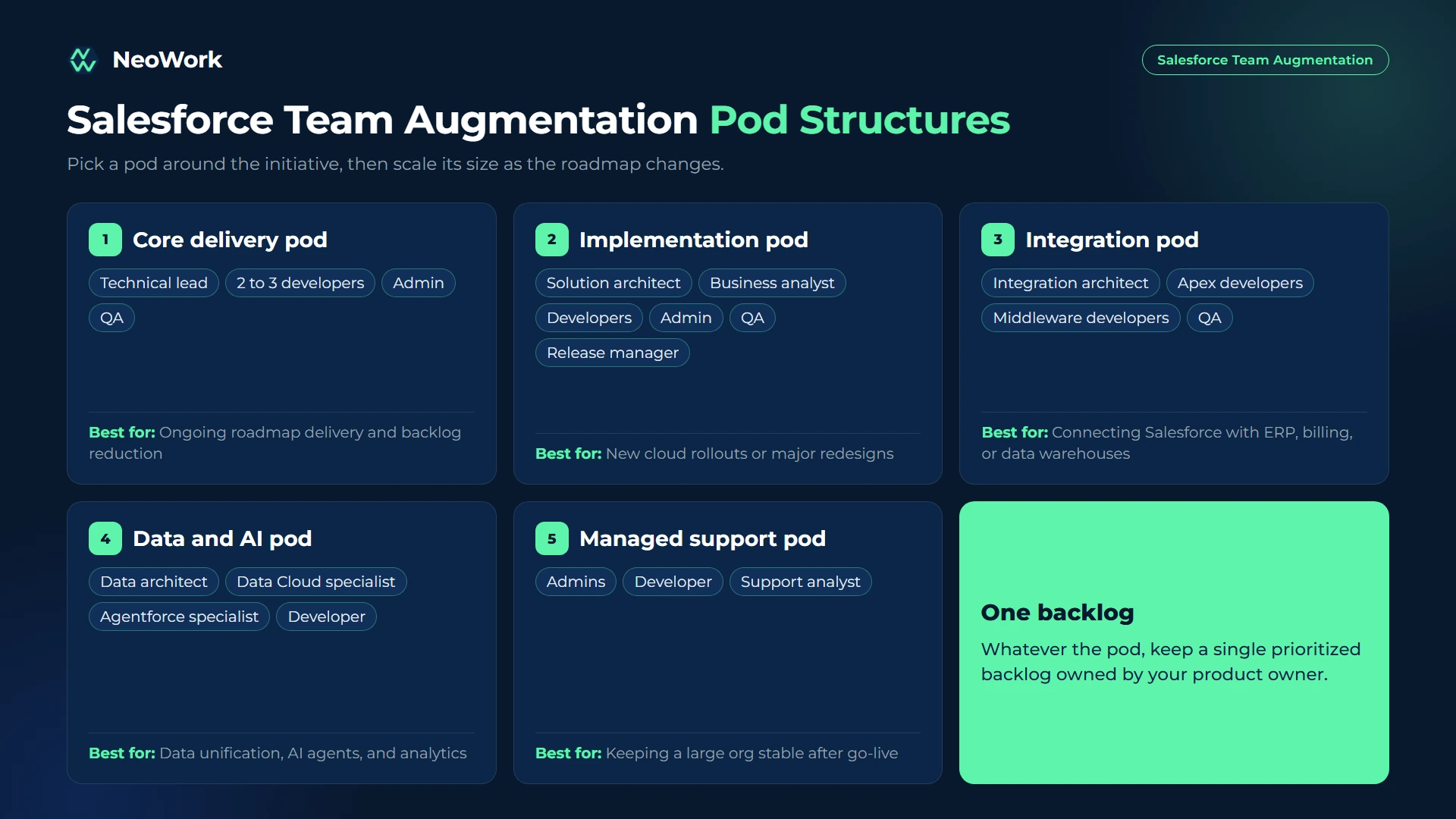
Typical Salesforce Team Structures

Pod Type Typical Roles Best For
Core delivery pod Technical lead, 2 to 3 developers, admin, QA Ongoing roadmap delivery and backlog reduction
Implementation pod Solution architect, business analyst, developers, admin, QA, release manager New cloud rollouts or major redesigns
Integration pod Integration architect, Apex and middleware developers, QA Connecting Salesforce with ERP, billing, data warehouses, or other systems
Data and AI pod Data architect, Data Cloud specialist, Agentforce and AI specialist, developer Data unification, AI agents, and analytics
Managed support pod Admins, developer, support analyst Keeping a large org stable after go-live
Salesforce team augmentation pod structures including core delivery, implementation, integration, data and AI, and managed support teams with typical roles

Build a Salesforce Team That Works Like Your Own

At NeoWork, we build dedicated Salesforce teams that join your roadmap as an extension of your in-house team. We assemble the mix of developers, admins, analysts, and QA you need, onboard them into your org and release process, and handle employment, benefits, and ongoing teammate support.

Our model includes:

  • Dedicated Salesforce pods built around your initiative and tech stack
  • A 3.2% candidate selectivity rate, with Salesforce-specific technical screening
  • Industry-leading 91% annualized teammate retention rate, so the team that learns your org stays with it
  • Team size that scales up or down as your roadmap changes

Contact us to share your Salesforce roadmap. We will propose a team structure, timeline, and budget that fit.

When to Choose Salesforce Team Augmentation

Team augmentation makes the most sense when your roadmap needs several roles at once. Architecture, development, configuration, and testing all have to move together on a major initiative, and adding them one by one through separate hires or contractors creates coordination overhead that your internal team may not have time for. A pod with its own technical lead absorbs much of that coordination.

It is also a strong choice when you want to keep knowledge in-house. A consulting partner delivering a fixed-scope project tends to take its understanding of your org with it at handover. An augmented team works alongside your people for months or years, attends the same meetings, and documents in the same places, so the knowledge accumulates inside your company rather than outside it.

Finally, team augmentation suits ongoing work better than projects do. If your Salesforce roadmap is continuous, with new requests every sprint, a stable team that knows the org will outperform a series of separate projects with different vendors.

Team Augmentation vs. Staff Augmentation vs. Consulting

Factor Team Augmentation Staff Augmentation Consulting Partner
What you get A multi-role pod Individual specialists A project team and deliverables
Who sets priorities You You Agreed scope with the partner
Who coordinates daily work Pod lead with your product owner Your team The partner
Knowledge retention High High Often low after handover
Best for Roadmaps and large initiatives Specific skill gaps Fixed-scope implementations

How to Govern a Shared Salesforce Org

When an augmented team and an internal team work in the same org, governance prevents collisions:

  • One backlog: Keep a single prioritized backlog owned by your product owner.
  • Clear environments: Give each workstream its own sandboxes and define how changes move from development to production.
  • Source control and DevOps: Use version control and a release tool such as DevOps Center, Gearset, or Copado so every change is tracked.
  • Design authority: Name one architect or lead who approves data model changes, integrations, and automation patterns.
  • Coding and naming standards: Agree on conventions for Apex, flows, fields, and permission sets before the first sprint.
  • Shared definition of done: Include tests, documentation, and peer review in every story.

How Much Does Salesforce Team Augmentation Cost?

The cost of a pod depends on its size, roles, seniority, specializations, and location. Common pricing approaches:

  • Monthly team rate: A fixed monthly price for the full pod. Predictable and easy to plan around.
  • Per-role monthly rates: Each role priced separately, which makes it easy to add or remove people.
  • Capacity-based: A set number of sprint points or hours per month.

Compare the cost of a pod with the full cost of hiring the same roles internally, including recruiting time, benefits, and the delay before they are productive. Our pricing page shows how we structure dedicated teams, and our overview of remote team augmentation companies can help you compare providers.

How to Launch an Augmented Salesforce Team

[Insert infographic here: salesforce-team-augmentation-launch.png - Seven Steps to Launch an Augmented Salesforce Team]

Alt text: Salesforce team augmentation launch plan from roadmap definition and team design to org access, discovery sprint, delivery sprints, and quarterly review

  1. Define the roadmap. List initiatives, priorities, and target dates for the next two to three quarters.
  2. Design the team. Match roles and seniority to the work, and decide which roles stay in-house.
  3. Interview key members. Meet the technical lead and senior members before they start.
  4. Set up access and environments. Create named users, permission sets, sandboxes, and source control access.
  5. Run a discovery sprint. Let the team review the org, documentation, and technical debt before committing to delivery.
  6. Deliver in sprints. Use shared ceremonies, demos, and release planning with your stakeholders.
  7. Review quarterly. Check velocity, quality, and business outcomes, and adjust team size as needed.

Questions Worth Asking Any Provider

  • Have your team members worked together before?
  • Who leads the pod day to day, and how do they work with our product owner?
  • Which DevOps and release tools does your team use?
  • How do you handle knowledge transfer if someone leaves?
  • Can we scale the pod up or down, and with how much notice?
  • Who owns the code, configuration, and documentation?

Common Salesforce Team Augmentation Mistakes

The mistake that causes the most damage is running two backlogs. When internal and augmented teams follow separate priority lists, they build overlapping features, overwrite each other's changes, and spend meetings negotiating rather than delivering. A single backlog with a single owner prevents most of this.

Closely related is the absence of a design authority. Without one person approving architecture decisions, different teams create duplicate fields, competing automation, and inconsistent integration patterns that take months to clean up. Skipping discovery has a similar effect: pods that start building before they understand the org add technical debt from the first sprint.

Finally, companies sometimes treat the pod as outsiders, excluding them from stakeholder meetings and planning sessions. The result is a team that builds exactly what the tickets say and misses what the business actually needed. Agreeing on documentation and handover standards from the start also matters, because every engagement eventually ends or changes shape.

Final Thoughts

Salesforce team augmentation gives you the capacity of a consulting team with the control and knowledge retention of an in-house team. It works best with one backlog, clear governance, strong DevOps practices, and a pod that is treated as part of your organization.

If your Salesforce roadmap is bigger than your team, explore our IT and development teams at NeoWork.

FAQ

What is Salesforce team augmentation?

It is an engagement model where an external provider supplies a dedicated, multi-role Salesforce team that works inside your org and processes, while your company keeps ownership of priorities.

What is the difference between Salesforce team augmentation and staff augmentation?

Staff augmentation adds individual specialists who your team manages. Team augmentation adds a coordinated pod with several roles and usually its own technical lead.

How big is a typical augmented Salesforce team?

Most pods have four to eight people, such as a technical lead, two or three developers, an admin, a business analyst, and QA. Size depends on the scope of the roadmap.

How long does it take to launch an augmented Salesforce team?

A pod can often start within a few weeks, followed by a one- or two-week discovery sprint before full delivery begins.

How do you prevent conflicts in a shared Salesforce org?

Use one backlog, separate sandboxes, version control, a release tool, a single design authority, and shared coding and naming standards.

How much does Salesforce team augmentation cost?

Providers usually charge a monthly team rate or per-role monthly rates. Cost depends on team size, seniority, specializations, and location.

Can an augmented team support Agentforce and Data Cloud projects?

Yes, if the pod includes specialists in data architecture, Data Cloud, and AI features. These roles are in high demand, so define the skills you need early.

Topics
No items found.

Salesforce Team Augmentation Guide: How It Works in 2026

Paper
Calendar Icon
Oct 29, 2026
Ann

Quick Summary: Salesforce team augmentation is when a company adds a complete, coordinated group of Salesforce professionals (for example, a technical lead, developers, an admin, a business analyst, and QA) to work alongside its in-house team on a roadmap or major initiative. Unlike staff augmentation, which adds individual people, team augmentation adds a working unit with its own delivery rhythm, while your company keeps ownership of priorities and the org. It is a common answer to a persistent shortage: an IDC study commissioned by Salesforce projected about 9.3 million new jobs in the Salesforce ecosystem by 2026. This guide covers team structures, when to choose team augmentation, how to govern a shared org, what it costs, and how to launch a pod successfully.

Some Salesforce work is too big for one extra person. A multi-cloud implementation, a merger of two orgs, a CPQ overhaul, or a Data Cloud and Agentforce program needs architecture, development, configuration, testing, and change management at the same time. Hiring all of those roles internally takes many months, and handing everything to a consultancy often means the knowledge leaves when the project ends.

Team augmentation sits in between. You get a ready-made Salesforce pod that works inside your org and your processes, and your team stays in control of what gets built and why.

What Is Salesforce Team Augmentation?

Salesforce team augmentation is an engagement model in which an external provider supplies a dedicated, multi-role Salesforce team that integrates with your organization. The augmented team works on your backlog, in your sandboxes and release pipeline, and reports to your product owner or Salesforce leader. The provider handles recruiting, employment, team composition, and continuity.

The difference from staff augmentation is scale and structure. Staff augmentation fills gaps one role at a time and relies on your team to coordinate the work. Team augmentation brings a group that already knows how to work together, usually with a technical lead who coordinates daily delivery. If you only need one or two roles, staff augmentation is usually the simpler choice.

Typical Salesforce Team Structures

Pod Type Typical Roles Best For
Core delivery pod Technical lead, 2 to 3 developers, admin, QA Ongoing roadmap delivery and backlog reduction
Implementation pod Solution architect, business analyst, developers, admin, QA, release manager New cloud rollouts or major redesigns
Integration pod Integration architect, Apex and middleware developers, QA Connecting Salesforce with ERP, billing, data warehouses, or other systems
Data and AI pod Data architect, Data Cloud specialist, Agentforce and AI specialist, developer Data unification, AI agents, and analytics
Managed support pod Admins, developer, support analyst Keeping a large org stable after go-live
Salesforce team augmentation pod structures including core delivery, implementation, integration, data and AI, and managed support teams with typical roles

Build a Salesforce Team That Works Like Your Own

At NeoWork, we build dedicated Salesforce teams that join your roadmap as an extension of your in-house team. We assemble the mix of developers, admins, analysts, and QA you need, onboard them into your org and release process, and handle employment, benefits, and ongoing teammate support.

Our model includes:

  • Dedicated Salesforce pods built around your initiative and tech stack
  • A 3.2% candidate selectivity rate, with Salesforce-specific technical screening
  • Industry-leading 91% annualized teammate retention rate, so the team that learns your org stays with it
  • Team size that scales up or down as your roadmap changes

Contact us to share your Salesforce roadmap. We will propose a team structure, timeline, and budget that fit.

When to Choose Salesforce Team Augmentation

Team augmentation makes the most sense when your roadmap needs several roles at once. Architecture, development, configuration, and testing all have to move together on a major initiative, and adding them one by one through separate hires or contractors creates coordination overhead that your internal team may not have time for. A pod with its own technical lead absorbs much of that coordination.

It is also a strong choice when you want to keep knowledge in-house. A consulting partner delivering a fixed-scope project tends to take its understanding of your org with it at handover. An augmented team works alongside your people for months or years, attends the same meetings, and documents in the same places, so the knowledge accumulates inside your company rather than outside it.

Finally, team augmentation suits ongoing work better than projects do. If your Salesforce roadmap is continuous, with new requests every sprint, a stable team that knows the org will outperform a series of separate projects with different vendors.

Team Augmentation vs. Staff Augmentation vs. Consulting

Factor Team Augmentation Staff Augmentation Consulting Partner
What you get A multi-role pod Individual specialists A project team and deliverables
Who sets priorities You You Agreed scope with the partner
Who coordinates daily work Pod lead with your product owner Your team The partner
Knowledge retention High High Often low after handover
Best for Roadmaps and large initiatives Specific skill gaps Fixed-scope implementations

How to Govern a Shared Salesforce Org

When an augmented team and an internal team work in the same org, governance prevents collisions:

  • One backlog: Keep a single prioritized backlog owned by your product owner.
  • Clear environments: Give each workstream its own sandboxes and define how changes move from development to production.
  • Source control and DevOps: Use version control and a release tool such as DevOps Center, Gearset, or Copado so every change is tracked.
  • Design authority: Name one architect or lead who approves data model changes, integrations, and automation patterns.
  • Coding and naming standards: Agree on conventions for Apex, flows, fields, and permission sets before the first sprint.
  • Shared definition of done: Include tests, documentation, and peer review in every story.

How Much Does Salesforce Team Augmentation Cost?

The cost of a pod depends on its size, roles, seniority, specializations, and location. Common pricing approaches:

  • Monthly team rate: A fixed monthly price for the full pod. Predictable and easy to plan around.
  • Per-role monthly rates: Each role priced separately, which makes it easy to add or remove people.
  • Capacity-based: A set number of sprint points or hours per month.

Compare the cost of a pod with the full cost of hiring the same roles internally, including recruiting time, benefits, and the delay before they are productive. Our pricing page shows how we structure dedicated teams, and our overview of remote team augmentation companies can help you compare providers.

How to Launch an Augmented Salesforce Team

[Insert infographic here: salesforce-team-augmentation-launch.png - Seven Steps to Launch an Augmented Salesforce Team]

Alt text: Salesforce team augmentation launch plan from roadmap definition and team design to org access, discovery sprint, delivery sprints, and quarterly review

  1. Define the roadmap. List initiatives, priorities, and target dates for the next two to three quarters.
  2. Design the team. Match roles and seniority to the work, and decide which roles stay in-house.
  3. Interview key members. Meet the technical lead and senior members before they start.
  4. Set up access and environments. Create named users, permission sets, sandboxes, and source control access.
  5. Run a discovery sprint. Let the team review the org, documentation, and technical debt before committing to delivery.
  6. Deliver in sprints. Use shared ceremonies, demos, and release planning with your stakeholders.
  7. Review quarterly. Check velocity, quality, and business outcomes, and adjust team size as needed.

Questions Worth Asking Any Provider

  • Have your team members worked together before?
  • Who leads the pod day to day, and how do they work with our product owner?
  • Which DevOps and release tools does your team use?
  • How do you handle knowledge transfer if someone leaves?
  • Can we scale the pod up or down, and with how much notice?
  • Who owns the code, configuration, and documentation?

Common Salesforce Team Augmentation Mistakes

The mistake that causes the most damage is running two backlogs. When internal and augmented teams follow separate priority lists, they build overlapping features, overwrite each other's changes, and spend meetings negotiating rather than delivering. A single backlog with a single owner prevents most of this.

Closely related is the absence of a design authority. Without one person approving architecture decisions, different teams create duplicate fields, competing automation, and inconsistent integration patterns that take months to clean up. Skipping discovery has a similar effect: pods that start building before they understand the org add technical debt from the first sprint.

Finally, companies sometimes treat the pod as outsiders, excluding them from stakeholder meetings and planning sessions. The result is a team that builds exactly what the tickets say and misses what the business actually needed. Agreeing on documentation and handover standards from the start also matters, because every engagement eventually ends or changes shape.

Final Thoughts

Salesforce team augmentation gives you the capacity of a consulting team with the control and knowledge retention of an in-house team. It works best with one backlog, clear governance, strong DevOps practices, and a pod that is treated as part of your organization.

If your Salesforce roadmap is bigger than your team, explore our IT and development teams at NeoWork.

FAQ

What is Salesforce team augmentation?

It is an engagement model where an external provider supplies a dedicated, multi-role Salesforce team that works inside your org and processes, while your company keeps ownership of priorities.

What is the difference between Salesforce team augmentation and staff augmentation?

Staff augmentation adds individual specialists who your team manages. Team augmentation adds a coordinated pod with several roles and usually its own technical lead.

How big is a typical augmented Salesforce team?

Most pods have four to eight people, such as a technical lead, two or three developers, an admin, a business analyst, and QA. Size depends on the scope of the roadmap.

How long does it take to launch an augmented Salesforce team?

A pod can often start within a few weeks, followed by a one- or two-week discovery sprint before full delivery begins.

How do you prevent conflicts in a shared Salesforce org?

Use one backlog, separate sandboxes, version control, a release tool, a single design authority, and shared coding and naming standards.

How much does Salesforce team augmentation cost?

Providers usually charge a monthly team rate or per-role monthly rates. Cost depends on team size, seniority, specializations, and location.

Can an augmented team support Agentforce and Data Cloud projects?

Yes, if the pod includes specialists in data architecture, Data Cloud, and AI features. These roles are in high demand, so define the skills you need early.

Topics

No items found.
Blue gradient banner with rounded corners at the top.
CTA Hexagon LeftCTA Hexagon LeftCTA Hexagon RightCTA Hexagon Right Mobile

Navigate the shadows of tech leadership – all while enjoying the comfort food that binds us all.

CTA Hexagon LeftCTA Hexagon LeftCTA Hexagon RightCTA Hexagon Right Mobile

Book a consultation

Build your team with NeoWork

Talk to us about how we staff and manage high-performing remote teams for companies like yours.